
Individual Control of fuel selectors
-
Sorry if this has been brought up before, but my search of the forums hasn't found anything about my specific issue. Hopefully it's something easy that I'm just too dense to figure out.
I've been trying to assign control of the fuel selectors to two of the switches on my Honeycomb Bravo. While I can set a (1) switch to turn both selectors on and off, I can't set switches to turn each on and off independently. I can assign a switch to turn selector 2 (right side) on and off by itself, but I can't seem to find a variable to control only the left side. The variables I have tried that actually make the left side function also make the right side function at the same time. I cannot turn the left side off without turning the right side off too (and we know what happens then!) Is there a variable that will allow me to turn off the left side fuel selector, without effecting the right side selector? I would think that there is, since I can control them individually with the mouse, but none of the ones I have tried are giving me that kind of control. I fly in VR, so flipping a switch to control fuel flow keeps me from having to reach for the mouse every time I need to adjust for a fuel imbalance! Has anyone else found a solution for this? -
I believe the reason for your confusion is that, in software, there is actually only one fuel selector for the one engine, even though there are two valves to click on. The events you're looking for are...
>K:FUEL_SELECTOR_OFF
>K:FUEL_SELECTOR_LEFT
>K:FUEL_SELECTOR_RIGHT
>K:FUEL_SELECTOR_ALL
This will take some simple scripting if you want two switches on your hardware to emulate the valves in cockpit. The script would look something like...
Right Toggle Switch Up:
(A:FUEL TANK SELECTOR:1, Enum) 0 == if{
    >K:FUEL_SELECTOR_RIGHT
}
els{
    >K:FUEL_SELECTOR_ALL
}
Right Toggle Switch Down:
(A:FUEL TANK SELECTOR:1, Enum) 3 == if{
    >K:FUEL_SELECTOR_OFF
}
els{
    >K:FUEL_SELECTOR_LEFT
}
Left Toggle Switch Up:
(A:FUEL TANK SELECTOR:1, Enum) 0 == if{
    >K:FUEL_SELECTOR_LEFT
}
els{
    >K:FUEL_SELECTOR_ALL
}
Left Toggle Switch Down:
(A:FUEL TANK SELECTOR:1, Enum) 2 == if{
    >K:FUEL_SELECTOR_OFF
}
els{
    >K:FUEL_SELECTOR_RIGHT
}
Alternatively, I just realized that there's probably a B:Var that would provide simpler control. If your binding software has access to B:Vars, you could try the following:
>B:FUEL_Selector_1 >B:FUEL_Selector_2 -
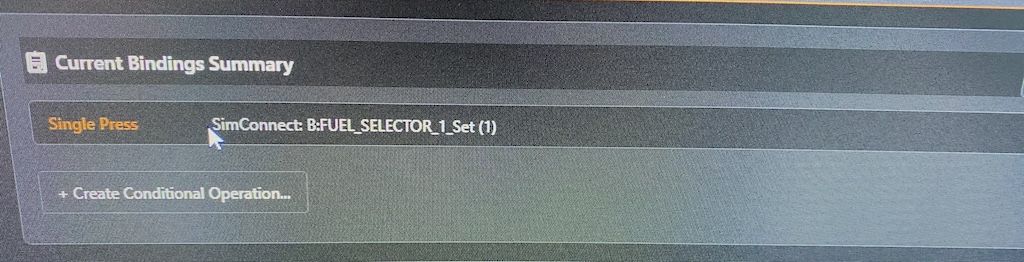 Thank you once again Nick! I think I tried the B:Vars, but not positive on that. I was successful getting the right selector working as Selector_2, but no response from the left. I'll try again when I'm back on my sim rig.
<Edit>
I had a few minutes to try the B:Var. I got it working as intended, using the B:Var as shown. For anyone else wanting to get this working, the switch(es) were set to function by using the values of (1) = on, (0) = off, FUEL_SELECTOR_1 being the left, therefore SELECTOR_2 being the right. Hope this helps someone else!
