Lvar for Generator Switch not working
-
I am using a small script "1·(>L:var_GeneratorSwitch,·number)". This is the reset function. The switch inside the cockpit does not move but at least the warning light gets turned off.
@RealPax said in Lvar for Generator Switch not working:
I am using a small script "1·(>L:var_GeneratorSwitch,·number)". This is the reset function. The switch inside the cockpit does not move but at least the warning light gets turned off.
I m also using this script now and it seems to work sometimes but for whatever reason it does not work everytime I press it, i have to push it several times it seems.... and animation of the switch is not working.
Maybe the dev can enlighten us how to assign it

-
Same issues as well: switch doesn't move, and the LVAR works intermittently. I've been fiddling with this a bit with SPAD. In FS2024 Dev mode, the animation uses O:XMLVAR_ELECTRICAL_Switch_Alternator_1_Animation_Position. Not quite sure what to do with that. I tried creating verious Client Events, but still no luck.
-
Hah, just found this thread googling for "L:var_GeneratorSwitch" because I'm having the same problem with a stream deck profile using Pilotsdeck. Everything works fine except the in-game switch animation. It's nice to know I'm not alone!
My suspicion is the L:var_GeneratorSwitch only affects the generator switch inside the brain of the machine, and not the switch itself:
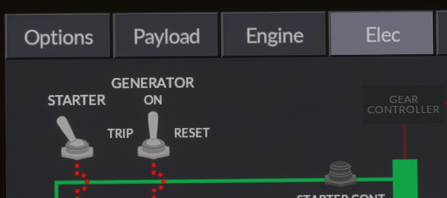
That switch there animates perfectly when I set L:var_GeneratorSwitch between 1, 0 and 2. Which means the reset and trip (and On) modes all work as they should. Just that this guy never budges:
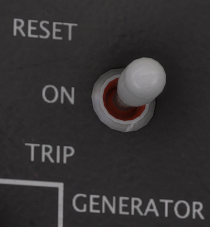
That said, the Behaviours tool shows references to L:var_GeneratorSwitch, so I'm just very confused and I'm hoping it's an animation bug rather than me doing something derpy.
@Black-Square, any idea what we're missing when it comes to the generator switch animation?
There are these standard vars:

But they don't seem to ever move from 0, so I guess are unused here..By the by, I saw another interesting thing I saw while testing things: (A:ELECTRICAL GENALT BUS AMPS:1, Amperes) returns 14.2 Amps with gernerator OFF after resetting the generator. Both the multimeter in game and the "GEN" section of the Elec map on the EFB shows 0A as you'd expect (as the generator was completely off, the only power was battery power), but that Avar is active and happy.
-
@RealPax said in Lvar for Generator Switch not working:
I am using a small script "1·(>L:var_GeneratorSwitch,·number)". This is the reset function. The switch inside the cockpit does not move but at least the warning light gets turned off.
I m also using this script now and it seems to work sometimes but for whatever reason it does not work everytime I press it, i have to push it several times it seems.... and animation of the switch is not working.
Maybe the dev can enlighten us how to assign it
@Rhinozherous said in Lvar for Generator Switch not working:
for whatever reason it does not work everytime I press it, i have to push it several times it seems
I saw similar behaviour - sometimes it would work, sometimes not. I fixed this by making it hold for 500ms and then flip back to the "ON" state of 0. Here it is in Pilotsdeck but I assume you could do similar with AAO, SPAD.next, etc etc.
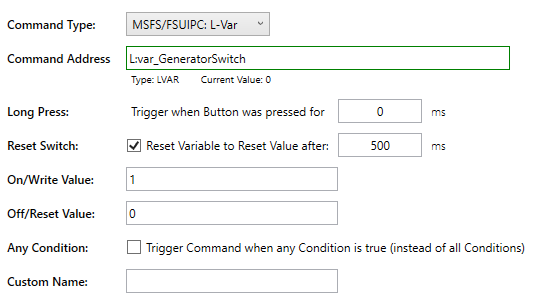
-
For Axis And Ohs I managed it, changing the Interior.xml a bit. At the component
ELECTRICAL_Switch_Alternator_1I added this code:<OVERRIDE_ANIM_CODE> (L:var_GeneratorSwitch, number) 1 == if{ 0 } (L:var_GeneratorSwitch, number) 0 == if{ 100 } (L:var_GeneratorSwitch, number) 2 == if{ 200 } </OVERRIDE_ANIM_CODE>Afterwards I used the "Layout Generator" from fs.to to recalculate the layout.json. Now I'm able to control the Switch using something like
1 (>L:var_GeneratorSwitch, number).@Black-Square It would be great if you could add this to one of the next updates. This was already missing in the 2020 version and drove me nuts.

-
@Ape42 can you share both the Interior.xml file and the new layout.json files?
@Black-Square is this on your radar for the next update as well?
-
@Ape42 can you share both the Interior.xml file and the new layout.json files?
@Black-Square is this on your radar for the next update as well?
@hangar_101 said in Lvar for Generator Switch not working:
@Ape42 can you share both the Interior.xml file and the new layout.json files?
@Black-Square is this on your radar for the next update as well?
Not without explicit permission by @Black-Square
-
I have this issue as well. I'd like to add my concern to this for @Black-Square to resolve. THANKS!!
@heyatoa This came up in another topic recently, and I have already fixed it for the next update. Thanks