ideas for enlarge engine instruments panel?
-
I apologize to the moderators and Nick for this not being a support question, but since Caravan users visit this thread, I have a better chance someone can help me.
My eyesight is getting worse and I have some difficulty reading the engine instruments clearly. This is particularly problematic during takeoff, since I can't clearly see the red TO line, or when setting the prop to 1750. Or to determine the fuel in the tanks. It's not an addon issue, it's my eyes. And unfortunately my 27" @1440 monitor isn't a solution either.
Initially I thought about buying a small display to connect to an Arduino and use Mobiflight to extract those instrument values (and learn some electronics along the way). But after asking on the home cockpits subreddit, they recommended buying a 12" portable monitor and using Air Manager. The downside of this option is this is a bit pricey: 120€ for the monitor + 60€ for Air Manager + 30€ for the Caravan panel (which I don’t know will be compatible with this addon).
I also considered creating a new window in FS24 to set up a second view centered on the engine instruments. But the perfomance hit is huge: almost 50% of FPS disappear having a 2nd view.
So I wanted to ask if you can think of any other solution to enlarge the engine instruments to a second monitor, a phone, etc.
BTW, I have a very old ipad nano 1st Gen!!! but as you can imagine, its imposible install on in any app

I appreciate any help
Regards
-
I have e eyesight issues too and simply look at the needle angle initially for a rough guide and then fine it up when the opportunity arises, hence another plus for steam over glass, but I used to also use a free app called spacedesk to run out stuff to another screen or tablet. You might find that useful if it is still around for your Apple paperweight

-
I have e eyesight issues too and simply look at the needle angle initially for a rough guide and then fine it up when the opportunity arises, hence another plus for steam over glass, but I used to also use a free app called spacedesk to run out stuff to another screen or tablet. You might find that useful if it is still around for your Apple paperweight
@Magic6420 said in ideas for enlarge engine instruments panel?:
I used to also use a free app called spacedesk to run out stuff to another screen or tablet. You might find that useful if it is still around for your Apple paperweight
I do have it installed on my old iPad. Unfortunately, the moment I create a second view or undock any instrument in the sim, the FPS drops by half, so sadly this option isn’t useful to me.
I’ll keep looking to see if there’s any panel or instrument in Air Manager that’s compatible with our Caravan before I invest.
In any case, I’d be happy to hear other options if anyone knows of more.
Regards
-
Do you use FS20 or 24? I'm using 24 and I have extended my first monitor to a 2nd monitor and the ipad nano (using spacedeck) too. But the moment I create a 2nd view in the sim, or undock the gps, without moving it out from main display, the perfomance instantly drops to 10 or 15fps. Maybe I'm doing something wrong?
-
2020 here I am afraid. My touchscreens run the TDS GTN750XI, Axis and Ohs, comms, joinfs, yoke software, Navigraph etc. but not other directly sim related displays these days. They do mean that all of this bumph is not hidden behind the main sim displayed on the primary monitor though.
Going back to the main point though, a steam driven cockpit should give you an easier time than glass if you have eyesight issues though. Picking out detail on a G1000 or whatever can be quite tricky. The Caravan gauges themselves seem small in what is after all, quite a large cockpit but the needles really point the way, if you will pardon the pun.
-
@Chotter why dont you use mousewheel for zoom or maybe try headtracker
-
@Chotter It isn't exactly what you're after but you could perhaps use Stream Deck for this.
You could use your old iPad, install the Elgato Stream Deck software on it - you get 65 buttons for free i think and a weeks free trial of MANY buttons.
You could then use Pilotsdeck (free plugin) to create your own readouts on the 6 free Stream Deck buttons. Tell me which readouts you particularly have trouble with and I'll see if I can make a reasonably proof of concept profile so you can see what I mean.
--
Edited to add some examples of what you could do with this
Here'sReady for take off:
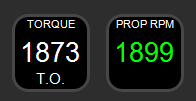
Overcooking it:
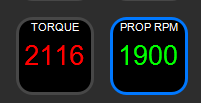
BAD TIMES AHEAD:
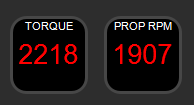
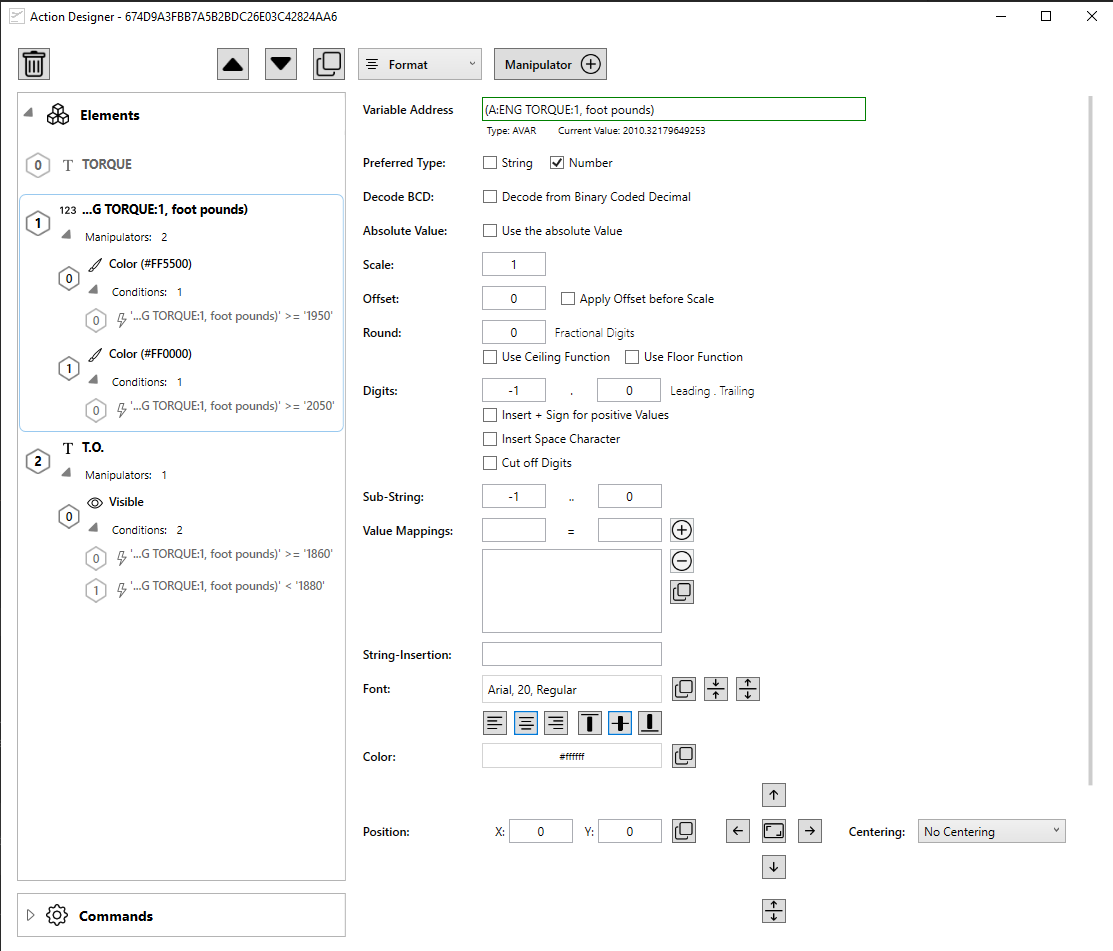
Everything is configurable. All I've done here is say:
- Give me some text that says "TORQUE". Put it here.
- Give me the numeric value for the current torque - "(A:ENG TORQUE:1, foot pounds)" - round it to the nearest whole unit because no one cares about decimals in this instance.
- Colour it orange if we go above 1950 and red if its above 2050 (numbers I plucked off the torque dial)
- Add a text label that says "T.O." but ONLY show it if the torque is between 1860 and 1880 - A value I picked out of the manual as a common take off torque but looking at the dial that, it should be at about 1880 to 1890 or so. Easy to change to get it dialed in how you like it.
The Pilotsdeck interface can look really intimidating but its actually pretty simple and very powerful. Reminds me of lego
There are also built in gauges you could use for this but I think my solution above would be better with bad eyes. But here's a couple of gauges I knocked up showing Torque and Prop RPM:
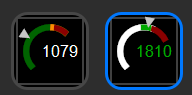
Anyway let me know if its of interest to you and I can help you build something you find useful if you need.
-
Jiblet, that is really impressive. I use several Streamdecks but hadn't got around to looking at Pilotsdeck. Will now though
@Magic6420 Thank you! it's really er... "easy". No. That's not the word...
Logical. It's really Logical. It can be a absolutely mind bending for some things, but it's really very powerful.
To be fair, the engine monitors I knocked up as a POC there were easy, took about 10 minutes. I don't want to put anyone off exploring pilotsdeck! It's managed to handle everything I've thrown at it so far, and it's free.
I'm currently in the (hopefully) final stages of what is basically a Stream Deck +version of Nick's KAS297B
This thing:
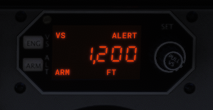
Trying to get that thousand-separator-comma is doing my head in, but I (think I) will not be beaten.
Here it is on the deck:
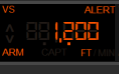
-
@django1489 said in ideas for enlarge engine instruments panel?:
@Chotter why dont you use mousewheel for zoom or maybe try headtracker
I do have TrackIr, but during takeoff and landing, I don't feel comfortable having to lean forward to check the instruments and lose sight of the runway, and the same goes for using the zoom. During the cruise there's no problem, even I can use the instrument view. That's why I'd prefer an option that lets me read the instruments and make any needed adjustments with a quick glance.
@Jiblet said in ideas for enlarge engine instruments panel?:
@Chotter It isn't exactly what you're after but you could perhaps use Stream Deck for this.
Thank you for your help. Sadly I have two problems with elgato: first one, apple doesn't allow to install new apps into old ipads like my nano 1st gen. And second one: I suspect the buttons of elgato devices are very small for my tired eyes but I'm not sure as I don't have any unit (very expensive too). It's a pitty, because I'm looking for an afordable and promising tool like Pilotsdeck.
My eyesight's getting older, and what happened with the Caravan instruments was the first warning sign. So, thinking in the long term, if finally I don't find a cheaper alternative, I suspect Air Manager is gonna be the best bet.
-
@django1489 said in ideas for enlarge engine instruments panel?:
@Chotter why dont you use mousewheel for zoom or maybe try headtracker
I do have TrackIr, but during takeoff and landing, I don't feel comfortable having to lean forward to check the instruments and lose sight of the runway, and the same goes for using the zoom. During the cruise there's no problem, even I can use the instrument view. That's why I'd prefer an option that lets me read the instruments and make any needed adjustments with a quick glance.
@Jiblet said in ideas for enlarge engine instruments panel?:
@Chotter It isn't exactly what you're after but you could perhaps use Stream Deck for this.
Thank you for your help. Sadly I have two problems with elgato: first one, apple doesn't allow to install new apps into old ipads like my nano 1st gen. And second one: I suspect the buttons of elgato devices are very small for my tired eyes but I'm not sure as I don't have any unit (very expensive too). It's a pitty, because I'm looking for an afordable and promising tool like Pilotsdeck.
My eyesight's getting older, and what happened with the Caravan instruments was the first warning sign. So, thinking in the long term, if finally I don't find a cheaper alternative, I suspect Air Manager is gonna be the best bet.
@Chotter Yeah the size of the button screens was something I was concerned with for you - hence using colours and extra widgets (like the "T.O." text that can come up). You can also make things flash and that sort of thing to draw attention at particular values.
If you have a phone that's newer than the iPad then maybe you can use that? Here's a photo of those widgets I made in a hurry running on an Phone 17.
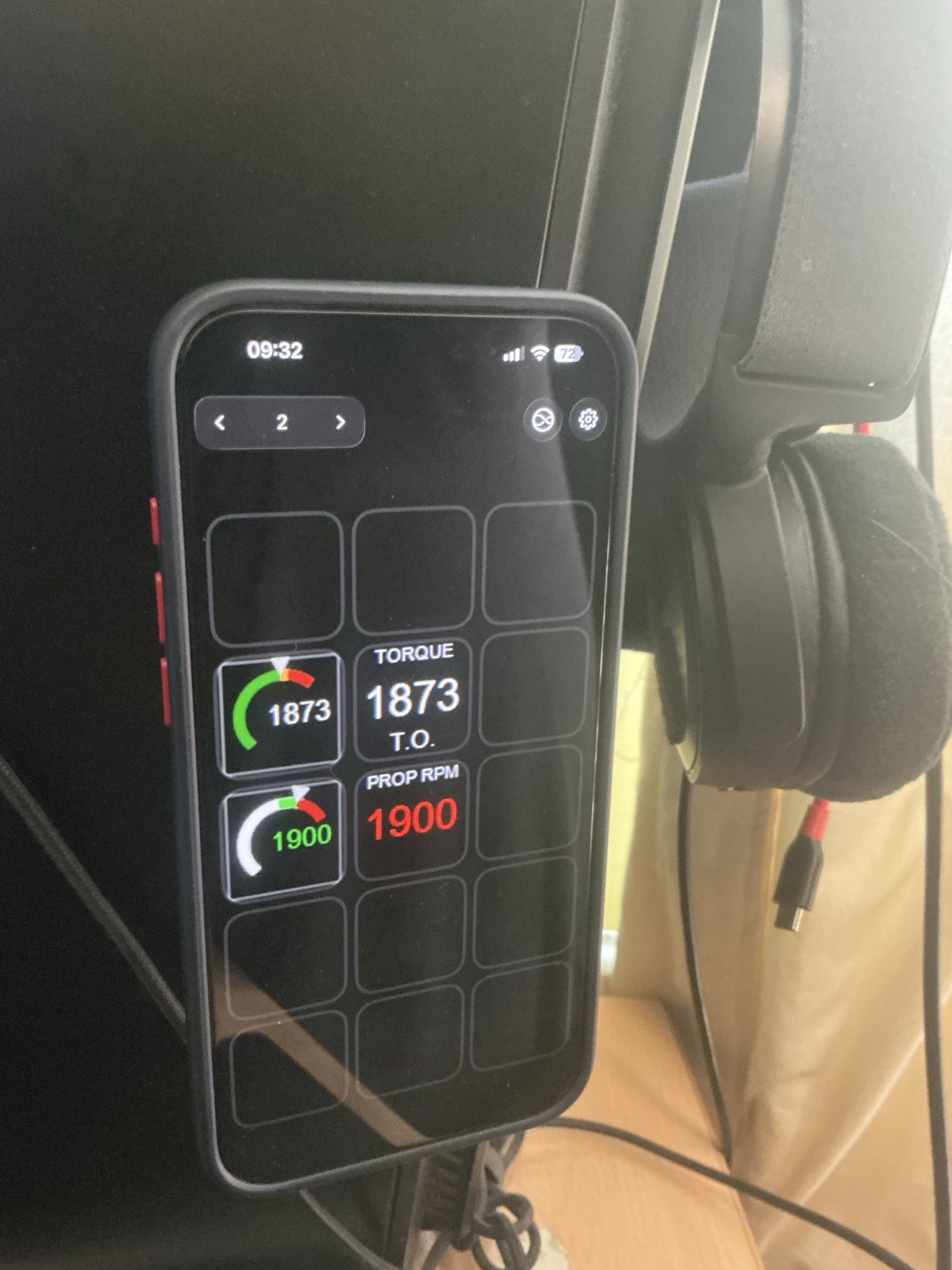
Pardon the potato quality, the good camera is on the phone!Each button is 2cm x 2cm
Air Manager might be your best way forward, I'm just trying to see what you can do for cheap or free
That and I have no idea about Air Manager!Good luck with it all, I hope you get back to a position where you can fly comfortably again.
If you do go this route and want any help, feel free to give me a shout. I'd be happy to help out. -
Maybe have phone camera facing the screen and have Gemini or chatgpt read the required numbers to you. Like a copilot
-
I flew in a multiplayer session last night whilst having this thread in the back of my mind. Having recently rehabilitated Tobii eye tracking, using the Opentrack software, I hate to say it, but the process was that seamless that I wasn't sure exactly how I did it! Head tracking wwon the day and by simply leaning forward towards the engine instruments got a great and precise view of everything I needed. Now that, is what I call intuitive.
-
I flew in a multiplayer session last night whilst having this thread in the back of my mind. Having recently rehabilitated Tobii eye tracking, using the Opentrack software, I hate to say it, but the process was that seamless that I wasn't sure exactly how I did it! Head tracking wwon the day and by simply leaning forward towards the engine instruments got a great and precise view of everything I needed. Now that, is what I call intuitive.
@Magic6420 Sorry to ask but why did you need to to use Opentrack?
MSFS202 and 24 And Xplane all support it out of the box now don't they? I know there was a time when you had to fudge it with opentrack.I'm wondering if I'm missing something useful with mine