Autopilot goes from VOR to ROLL when tracking VOR
-
@MarkS If you really want to open that can of worms for yourself, search for the following in Starship_Interior.XML
(>L:var_AutopilotDisconnectTone, bool)I'm happy to help with that. I just wanted to give you a quick answer before I left my desk for a few minutes.
@Black-Square said in Autopilot goes from VOR to ROLL when tracking VOR:
I'm happy to help with that. I just wanted to give you a quick answer before I left my desk for a few minutes.
@Black-Square Nick, sorry, I know you're a busy guy, but I'm going to have to ask for some help with this. My first calculator was a slide rule way back last century, but this RPN stuff throws me once the nesting starts. I have to tease it out into a non-RPN form to try to get a handle on it, and even then I'm not sure I'm getting it right.
(In fact, I'm pretty sure I introduced an intermittent timing issue with my "personalization" mod, because I get spurious warning button activations from time to time, sometimes only transient, sometimes they cycle for a while. That's on me though, not asking for your help with that.)
To recap, what I am looking to do is to trigger the autopilot disconnect tone if the autopilot fails over from NAV to ROLL mode. And of course it should cease sounding if I press the autopilot disconnect button as usual.
If CurrMode = ROLL and LastMode = NAV then
    PlaySound(AutopilotDisconnect)
LastMode = CurrMode
The code itself likely isn't that hard, but I'm having trouble locating the relevent mode variables, and there's nested code in that whole Flight Director section that I can't quite get my head around, so I'm not sure where to safely put the code even if I had the vars on hand.
-
@MarkS Give this a try
 I'm not sure exactly what this will do, but it should be a good place to start.
<UseTemplate Name="ASOBO_GT_Update"> <FREQUENCY>1</FREQUENCY> <UPDATE_CODE> (A:AUTOPILOT MASTER, bool) (O:lastApNavMode) (A:AUTOPILOT BANK HOLD, Bool) (A:AUTOPILOT WING LEVELER, Bool) or and and if{ 1 (>L:var_AutopilotDisconnectTone, bool) } (A:AUTOPILOT NAV1 LOCK, bool) (>O:lastApNavMode) </UPDATE_CODE> </UseTemplate> -
@MarkS Give this a try
I'm not sure exactly what this will do, but it should be a good place to start.<UseTemplate Name="ASOBO_GT_Update"> <FREQUENCY>1</FREQUENCY> <UPDATE_CODE> (A:AUTOPILOT MASTER, bool) (O:lastApNavMode) (A:AUTOPILOT BANK HOLD, Bool) (A:AUTOPILOT WING LEVELER, Bool) or and and if{ 1 (>L:var_AutopilotDisconnectTone, bool) } (A:AUTOPILOT NAV1 LOCK, bool) (>O:lastApNavMode) </UPDATE_CODE> </UseTemplate>@Black-Square said in Autopilot goes from VOR to ROLL when tracking VOR:
@MarkS Give this a try I'm not sure exactly what this will do, but it should be a good place to start.
Thank you. Any particular location in the Flight Director code section you'd recommend to put it?
-
You can drop that anywhere in the file between other
<UseTemplate Name="ASOBO_GT_Update">tags. For instance, right after the<!-- Flight Director -->comment. -
You can drop that anywhere in the file between other
<UseTemplate Name="ASOBO_GT_Update">tags. For instance, right after the<!-- Flight Director -->comment.@Black-Square I'll give it a go. I suppose it could be dropped in anywhere but in good practice it ought to be at least near the other relevant functionality.
(P.S. as hard as it is for me to parse RPN, your code is a treat to work with for this old automation engineer).
-
You can drop that anywhere in the file between other
<UseTemplate Name="ASOBO_GT_Update">tags. For instance, right after the<!-- Flight Director -->comment.@Black-Square no joy.

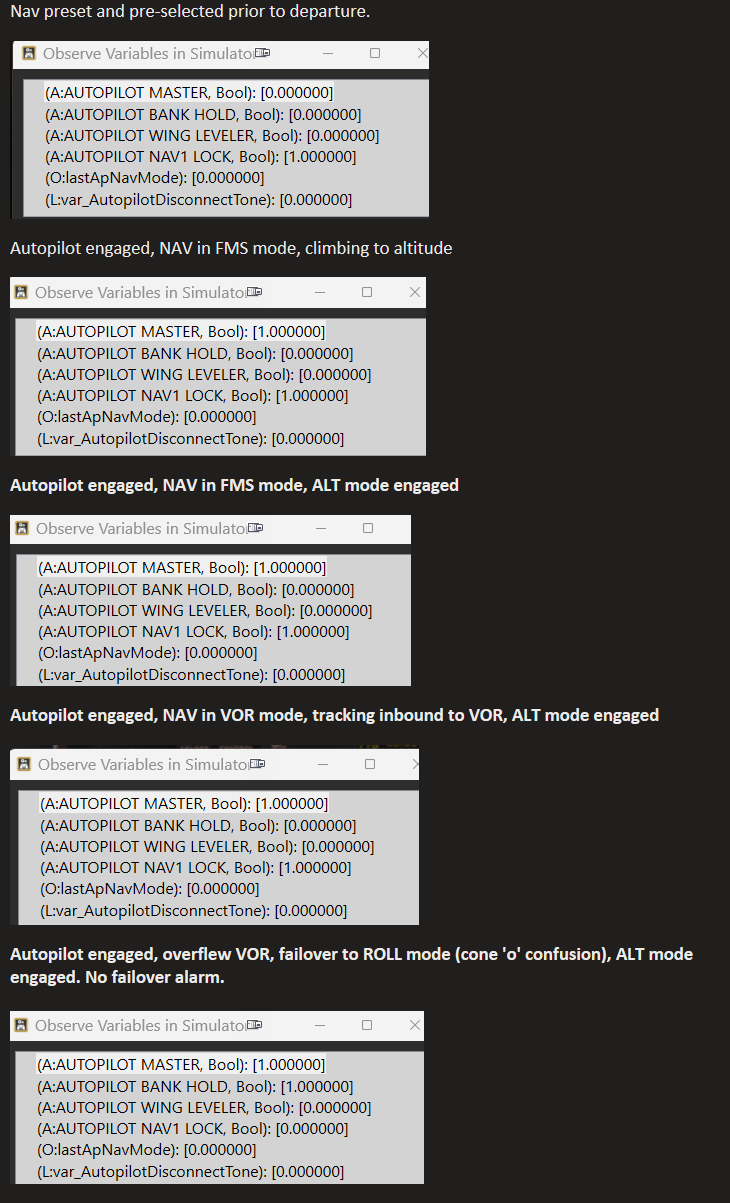
According to an Axes and Ohs watch list I set up to monitor, it appears the O:lastApNavMode variable isn't getting updated,(what is an O variable anyway?), or perhaps Axes and Ohs isn't capable yet of seeing it. I can declare it in the watch list, and it appears, but that doesn't necessarily mean there's communication to it.
I did a test flight with two VORs and deliberately flew through their zone 'o' confusion to force a failover from NAV to ROLL. Which happened as expected, but no alarm.
In fact, the AUTOPILOT BANK HOLD and AUTOPILOT WING LEVELER are never '1' at any point in during flight testing, and I'm not sure if it's something I'm doing or not doing or its just one of those weird things that are out of our hands like state saving.
This tickles my old engineering brain a little and I'm tempted to take a crack at it. I'm wondering if I can just declare a var in the interior.xml that Axes and Ohs can (demonstrably) see, to replace the O var. Maybe Mr Occam had a nice shave and will smile kindly on my attempt.
Here's the sequence with the Axes and Ohs watch lists.
-
O:Vars are local to the scope of that UseTemplate tag, but if you just replace the O with an L, that should make it globally visible.
Do I misunderstand your message, or is AUTOPILOT BANK HOLD true in your last screenshot, right when we expect it to be?
I don't see anything wrong with the code, but I can test it when I'm next working in the simulator. Can you show me where you inserted it into the file?
-
O:Vars are local to the scope of that UseTemplate tag, but if you just replace the O with an L, that should make it globally visible.
Do I misunderstand your message, or is AUTOPILOT BANK HOLD true in your last screenshot, right when we expect it to be?
I don't see anything wrong with the code, but I can test it when I'm next working in the simulator. Can you show me where you inserted it into the file?
@Black-Square said in Autopilot goes from VOR to ROLL when tracking VOR:
Do I misunderstand your message, or is AUTOPILOT BANK HOLD true in your last screenshot, right when we expect it to be?
No, that's on me, I missed that it was set. Nice catch. Interesting though, that Wing Leveler is never true.
I put the new code at the top of the Flight Director section (I was bold and already changed the O to an L but haven't had a chance to test it yet).
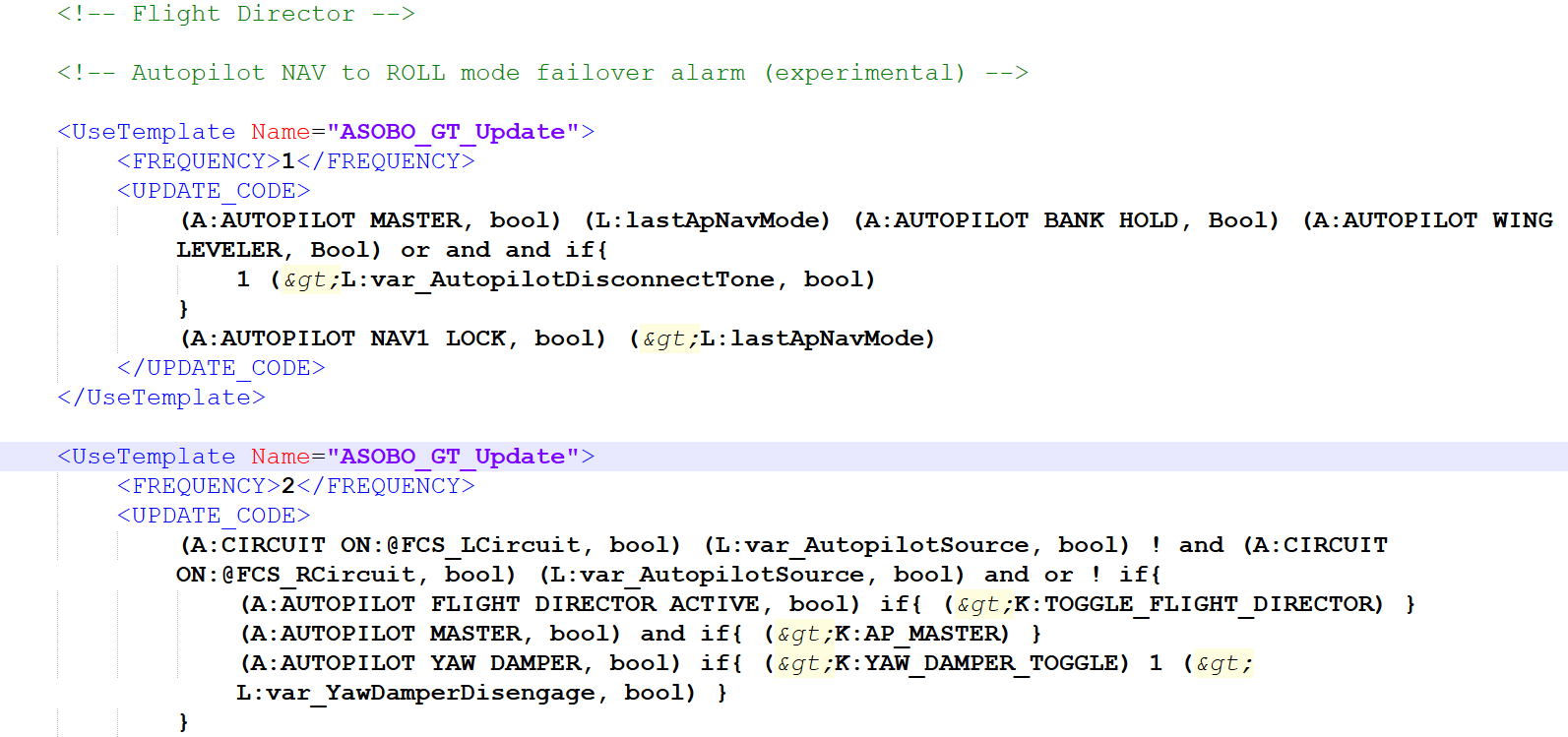
I sat with it for a bit afterwards and thought it might simplify to something like this (sorry for the infix pseudocode, can't "think" in RPN):
If
	A:AUTOPILOT_MASTER = True and L:lastApNavMode = True and A:AUTOPILOT_NAV1_LOCK = False
Then
	L:var_AutopilotDisconnectTone := 1
Endif
L:lastAPNavMode := A:AUTOPLOT_NAV1_LOCK
The RPN issue I have with the above is that the NAV1 LOCK comparator is (I think) an "and not" operation in RPN, and I don't know how to do that. I'm not entirely sure what BANK HOLD or WING LEVELER are bringing to the party, but you surely have a better handle on that than I.
-
J jmarkows referenced this topic on
-
Against my better judgement, I came up with this refactoring of the infix pseudocode I proposed above:
<!-- Mark's Occam-Channeling Autopilot NAV to ROLL mode failover alarm (probably doesn't work) --> <UseTemplate Name="ASOBO_GT_Update"> <FREQUENCY>1</FREQUENCY> <UPDATE_CODE> (A:AUTOPILOT NAV1 LOCK, bool) (L:lastApNavMode) (A:AUTOPILOT MASTER, bool) not and and if { 1 (>L:var_AutopilotDisconnectTone, bool) } (A:AUTOPILOT NAV1 LOCK, bool) (>L:lastApNavMode) </UPDATE_CODE> </UseTemplate>I looks almost right to my eye, but I still don't know if that 'and not' is legal. Guess I'll find out later.
 At least it's easy to remove if (when) it fails spectacularly.
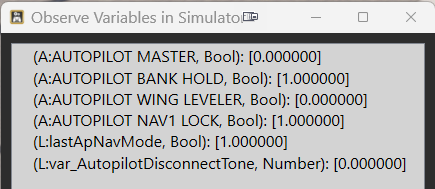
Addendum: It didn't fail, but it didn't work either. @Black-Square shouldn't (L:lastApNavMode) be (L:lastApNavMode, bool) instead?
-
The code was working, but the sound was only triggering once. Try this:
(L:var_AutopilotSource, bool) ! (L:var_ActiveNavSource_L, number) 2 < and
(L:var_AutopilotSource, bool)   (L:var_ActiveNavSource_R, number) 2 < and
or
(A:AUTOPILOT BANK HOLD, Bool) (A:AUTOPILOT WING LEVELER, Bool) or and
(A:AUTOPILOT MASTER, bool) and
if{
	(L:lastApNavMode, bool) if{
		1 (>L:var_AutopilotDisconnectTone, bool)
	}
	els{
		0 (>L:var_AutopilotDisconnectTone, bool)
	}
}
(A:AUTOPILOT NAV1 LOCK, bool) (>L:lastApNavMode, bool)
I added some extra features for you while I was at it. It should only trigger when you're using VOR navigation now too.
Thanks for putting me back in Starship for just a couple minutes. What an absolutely magnificent machine.
-
The code was working, but the sound was only triggering once. Try this:
(L:var_AutopilotSource, bool) ! (L:var_ActiveNavSource_L, number) 2 < and
(L:var_AutopilotSource, bool)   (L:var_ActiveNavSource_R, number) 2 < and
or
(A:AUTOPILOT BANK HOLD, Bool) (A:AUTOPILOT WING LEVELER, Bool) or and
(A:AUTOPILOT MASTER, bool) and
if{
	(L:lastApNavMode, bool) if{
		1 (>L:var_AutopilotDisconnectTone, bool)
	}
	els{
		0 (>L:var_AutopilotDisconnectTone, bool)
	}
}
(A:AUTOPILOT NAV1 LOCK, bool) (>L:lastApNavMode, bool)
I added some extra features for you while I was at it. It should only trigger when you're using VOR navigation now too.
Thanks for putting me back in Starship for just a couple minutes. What an absolutely magnificent machine.
@Black-Square said in Autopilot goes from VOR to ROLL when tracking VOR:
Thanks for putting me back in Starship for just a couple minutes. What an absolutely magnificent machine.
Indeed it is, and I'll have more to say on that in another thread. But for openers...
YES! YES! Happy dance underway. It works! Gave me a bit of a scare, as I'd forgotten to update layout.json after editing the interior.xml, and the first time I loaded in, the cockpit had been eaten! After a brief moment of panic, I got that sorted.
A couple of quick tests near my local VOR (it's still weird to me flying Starship near my home), and we have a winner! Here's the test results:
NAV-ROLL Failover - Enhanced Version - Functional Test
Test environment:
Win 11, MSFS 2024
Departure: KRDG
Destination: KPHL
Intermediate VOR: PTW 116.50, CRS 126 deg, 21 nm from KRDGNav preset and pre-selected prior to departure.
Autopilot engaged, NAV in FMS mode, climbing to altitude (3500 AGL)
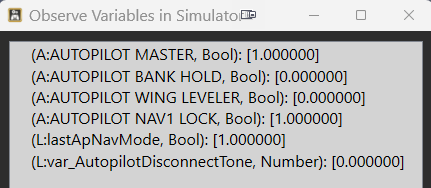
Autopilot engaged, NAV in FMS mode, ALT mode engaged
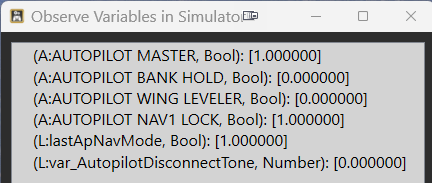
Autopilot engaged, NAV in VOR mode, tracking inbound to VOR, ALT mode engaged
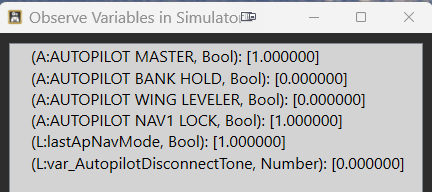
Autopilot engaged, overflew VOR, failover to ROLL mode (cone 'o' confusion), ALT mode engaged.
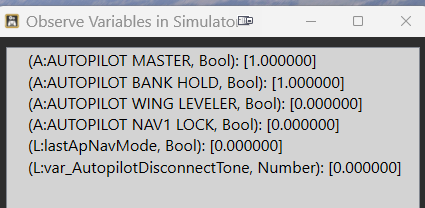
The only change I would make, is to keep the disconnect alarm sounding until silenced by the pilot, just like a normal autopilot disconnect, rather than the one-shot alarm that's in there now. It is easy to miss, like the MDA alarm (at least for me).
Next step for me is to roll this into my "personalization" mod where I've changed a few things to better suit how I'd leave the plane if I actually owned one. (I would pay genuine cash money just for the opportunity to sit in the cockpit and preflight one of these for real.)
Although I've not experienced this in any of your other aircraft, this should be adaptable into the Caravan's interior.xml for those experiencing the issue there, would you agree?
-
Hi,
While searching for solutions for switching from NAV to ROL on the MSFS KAP 140, I came across this thread.
I'm part of AVNX, and we develop touch panels for the air manager software. We created a free Cessna 152 and integrated a KAP 140 into the touch panel. We activated it via a mod by enabling the autopilot in the system.cfg file. The only problem is tracking a VOR in Nav mode. There, the autopilot occasionally switches from Nav (Nav Hold) to ROL (wing leveler).
To minimize this, I've adjusted the autopilot parameters several times in the system.cfg file. There, by entering values such as these, you can significantly influence the autopilot:
nav_proportional_control_ex1=10
nav_integrator_control_ex1=1
nav_derivative_control_ex1=5
nav_integrator_boundary_ex1=5
nav_derivative_boundary_ex1=10It works quite well now. However, the autopilot still occasionally switches from NAV to ROL, though much less frequently than before.
Since the interactions of these parameters are not described in the SDK, I would be interested to hear if anyone has already found a solution. I am currently 51 NM at 2500 ft outbound from a VOR, and it has only switched once.
-
Hi,
While searching for solutions for switching from NAV to ROL on the MSFS KAP 140, I came across this thread.
I'm part of AVNX, and we develop touch panels for the air manager software. We created a free Cessna 152 and integrated a KAP 140 into the touch panel. We activated it via a mod by enabling the autopilot in the system.cfg file. The only problem is tracking a VOR in Nav mode. There, the autopilot occasionally switches from Nav (Nav Hold) to ROL (wing leveler).
To minimize this, I've adjusted the autopilot parameters several times in the system.cfg file. There, by entering values such as these, you can significantly influence the autopilot:
nav_proportional_control_ex1=10
nav_integrator_control_ex1=1
nav_derivative_control_ex1=5
nav_integrator_boundary_ex1=5
nav_derivative_boundary_ex1=10It works quite well now. However, the autopilot still occasionally switches from NAV to ROL, though much less frequently than before.
Since the interactions of these parameters are not described in the SDK, I would be interested to hear if anyone has already found a solution. I am currently 51 NM at 2500 ft outbound from a VOR, and it has only switched once.
@FlightEngineer1 Thanks for your input. As an old real-time industrial automation engineer, I really wish they'd expose the tuning parameters in real-time, so those of us who truly understand how to tune a PID loop using one of the formal methodologies (aka "the right way"), as opposed to just guessing, winging it, or using the defaults as so often seems to be the case with some other aircraft.
</rant>
Edit to add: and they've been missing filter constants forever. Geez.
-
@FlightEngineer1 Thanks for your input. As an old real-time industrial automation engineer, I really wish they'd expose the tuning parameters in real-time, so those of us who truly understand how to tune a PID loop using one of the formal methodologies (aka "the right way"), as opposed to just guessing, winging it, or using the defaults as so often seems to be the case with some other aircraft.
</rant>
Edit to add: and they've been missing filter constants forever. Geez.
-
Hi Mark,
You can view the operation of the autopilot parameters in debug mode. Unfortunately, that's not very helpful for me.
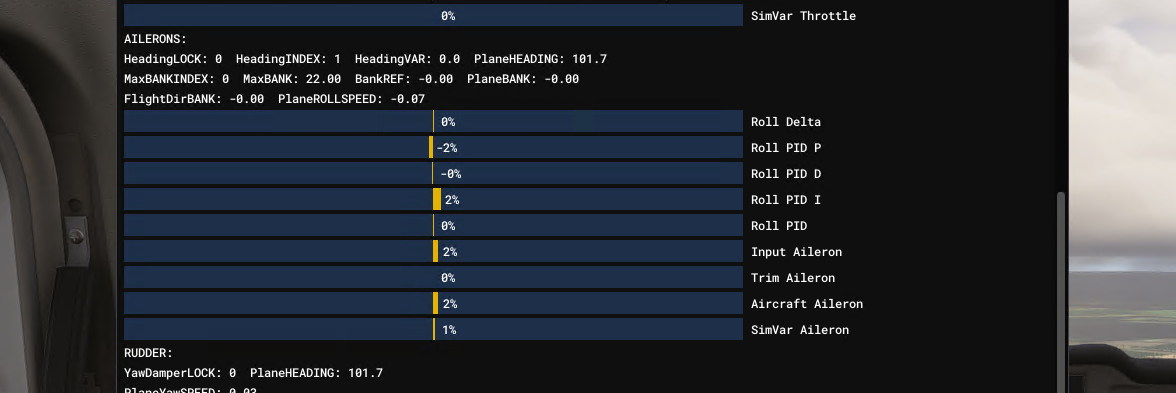
-
Hi Mark,
You can view the operation of the autopilot parameters in debug mode. Unfortunately, that's not very helpful for me.
@FlightEngineer1 yeah, no. I want an external interface where it reads/writes those vars in real time over SimConnect. Old-school me wants an Excel plug-in so I can run proper Ziegler-Nichols analysis tools. I keep dreaming, and nothing keeps happening.
-
@FlightEngineer1 yeah, no. I want an external interface where it reads/writes those vars in real time over SimConnect. Old-school me wants an Excel plug-in so I can run proper Ziegler-Nichols analysis tools. I keep dreaming, and nothing keeps happening.
@MarkS Yes, it would be nice if one could quickly determine reasonable PID values without constant testing. Strangely, this only occurs with the autopilot activated in the Cessna 152 when tracking VORs; everything is fine when tracking the GPS flight path. Therefore, I wondered if MSFS had artificially degraded the signal using a random number generator.
But that can't be the case, since the C172 doesn't have this problem.
What always works is the cone of confusion and, of course, the maximum range. To avoid triggering an error due to the missing line of sight, I also tested this at higher altitudes in flat terrain. Sometimes the autopilot tracks 50 NM without interruption, and then it cuts out for no apparent reason.
There's also a peculiarity with the C152 that I only discovered by constantly monitoring the bus voltage variable. For a few milliseconds, the bus voltage drops to zero. You can't see it on the instruments. But since a missing bus voltage triggers a restart of my autopilot in my LUA script, it keeps restarting. The autopilot in the Cessna remains switched on.
In summary, this means to me that clean tracking can only be achieved with correct PID values for navigation, roll, etc.
-
@MarkS Yes, it would be nice if one could quickly determine reasonable PID values without constant testing. Strangely, this only occurs with the autopilot activated in the Cessna 152 when tracking VORs; everything is fine when tracking the GPS flight path. Therefore, I wondered if MSFS had artificially degraded the signal using a random number generator.
But that can't be the case, since the C172 doesn't have this problem.
What always works is the cone of confusion and, of course, the maximum range. To avoid triggering an error due to the missing line of sight, I also tested this at higher altitudes in flat terrain. Sometimes the autopilot tracks 50 NM without interruption, and then it cuts out for no apparent reason.
There's also a peculiarity with the C152 that I only discovered by constantly monitoring the bus voltage variable. For a few milliseconds, the bus voltage drops to zero. You can't see it on the instruments. But since a missing bus voltage triggers a restart of my autopilot in my LUA script, it keeps restarting. The autopilot in the Cessna remains switched on.
In summary, this means to me that clean tracking can only be achieved with correct PID values for navigation, roll, etc.
Hi,
After spending a lot of time troubleshooting the abrupt switch from NAV to ROL of the autopilot, I've discovered the following:
In the system.cfg file, MSFS 2024 only uses a few parameters from the [autopilot] section; all others are obsolete. (https://docs.flightsimulator.com/msfs2024/html/5_Content_Configuration/CFG_Files/CFG_Files_Obsolete_Parameters.htm)
Instead, it uses the parameters from the ai.cfg file that are in the [STICKANDRUDDER] section for the autopilot. I'm currently testing the following settings for the C152.
;pitchPID = 1.8, 0.07, 2.4, 0.7, 10

rollPID = 1.9, 0.22, 2.4, 6, 100

headingPID = 1.5, 0.005, 1.6, 0.1, 1

;verticalSpeedPID = 0.42, 0.035, 0.28, 250, 1000

nav_ex1PID = 3.0, 0.025, 6.0, 0.008, 50

nav_yawPID = 0.05, 0.02, 0.003, 1, 360

glideSlopePID = 5.8, 0.04, 2.4, 1.2, 60

The problem is just the fine Tuning. Sometimes I can fly 50 NM in NAV mode and then it disconnects. The most important setting for the aircraft is "nav_ex1PID".