
Baro setting on autopilot - autopilot altitude?
-
Saw the note about the barometer setting for the autopilot. Tested it out because the autopilot seemed to be capturing the right altitudes. Altimeter setting was 30.18 - and that's what my pilot altimeter was set to - I set the autopilot and the copilot side (so i could monitor it) to 29.80 - set the autopilot to 7000 in a descent and the autopilot locked on right at 7000 feet - copilot was showing around 6700 (which is what the autopilot should have been seeing).
Also just noticed that changing my baro setting on my main (pilots) altimeter causes the autopilot to change pitch to bring it back to the assigned altitude. So it seems that the autopilot is ignoring the baro setting on it. Or I'm misunderstanding how it works.
-
No, that's very plausible. I know which configurations affect this, and it's perpetually confusing, at least to me. I'll get that sorted out asap.
-
I am unable to reproduce this, unfortunately. I tried in MSFS 2024 and 2020, and both are behaving as expected, and the code is identical across all variants. I don't suppose you're using any hardware that might be interfering with this? It's possible that setting the barometer with no altimeter index might default to setting all altimeters at the same time, which could cause some confusion.
-
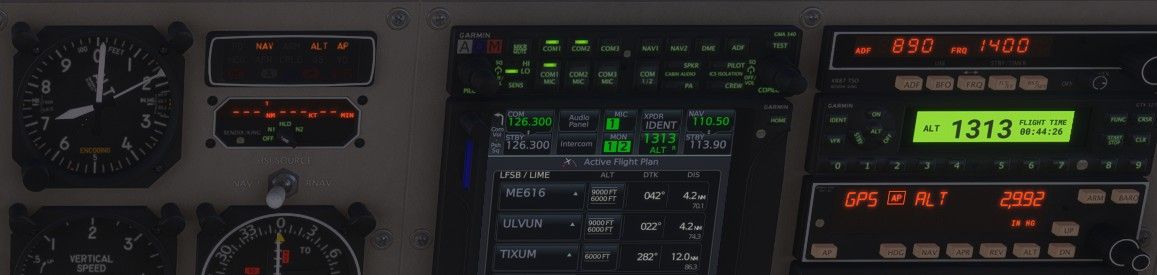
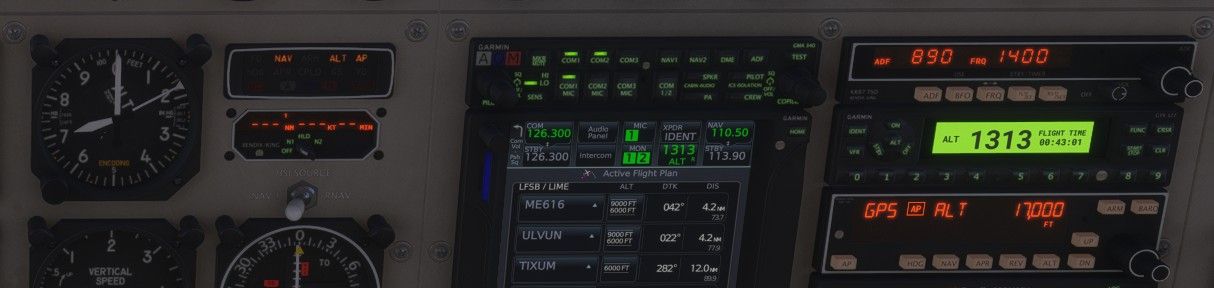
I'm in a flight right now for example - I haven't touched the altimeter setting on the autopilot - it's set at 29.92. Autopilot is set for 17,000 feet - and I'm at exactly 17,000 feet with my altimeter set to 30.13. If I'm understanding it right my indicated altitude should be off.
-
@Black-Square Here it is on video: https://www.youtube.com/watch?v=SuT0yDEPCyc
-
Ah! It was the PMS50 GTN that was key here! Indeed, it appears to default to altimeter 1, rather than the autopilot's altimeter. I'm looking at the documentation right now, but I might have to ask the developer if this is a supported feature.
-
@Black-Square , Seeing the same thing here but I use the TDS GTN. Adjusting the barometer setting on the altimeter changes the target altitude in the AP.
I have been having other really strange autopilot issues where it will not capture the altitude sometimes when armed, however it may be related to this same thing.
-
I asked the PMS50 GTN developer, and I tested some other avionics. It appears this just isn't a commonly supported feature amongst 3rd party GPS units. Kind of a shame, since my Commander 114 will use a similar method with a different autopilot. I suppose I could make the autopilot Altimeter #1, but I'm worried about that causing some undocumented weirdness, like in the HUD, or with ATC, or who knows what else. I figure we could get a solution for this from PMS and TDS pretty easily, but WT's deployment cycle would probably take until a convenient Sim Update.
-
Hey Nick, same as the guy above me, I'm using the WT GNS 530/430 combo and I'm seeing the KAP140 baro setting having no effect and the main altimeter setting controlling the AP.
Currently flying the Cargomaster in MSFS 2024, Caravan v1.1.
Edit: removing the ping, as based on the comment re: WT update cycle I suspect you're aware of this.
I thought it worked in the Analog Caravan in 2020 though? I was using WT avionics back then, as well.

