Controlling the Heading Indicator with hardware
-
Hello everyone,
Thank you to the team for delivering such a fantastic addon with the caravan. Absolutely loved the Dukes and this is an amazing evolution from there.
I'm hoping you can help me with some problems I'm having getting the heading bug to work with rotary dials via SPAD.next - I cannot seem to find the right variable to use. Has anyone had any success getting it to work? I've been able to get everything else up and running, it's just heading that is eluding me so far (I can't see it in the documented LVARs either)
I have a sneaking suspicion that I will have to use some expression in SPAD next config - I'm still very much learning that, if anyone has a note of what that is, I'd be super grateful!
Thanks,
Louise.
-
Hi Louise! Glad to hear you're enjoying the aircraft.
Hopefully someone else with more programming experience can confirm this, but it should be no more complicated than
K:HEADING_BUG_INC,K:HEADING_BUG_DEC', or entering a value directly withK:HEADING_BUG_SET`. -
Hello everyone,
Thank you to the team for delivering such a fantastic addon with the caravan. Absolutely loved the Dukes and this is an amazing evolution from there.
I'm hoping you can help me with some problems I'm having getting the heading bug to work with rotary dials via SPAD.next - I cannot seem to find the right variable to use. Has anyone had any success getting it to work? I've been able to get everything else up and running, it's just heading that is eluding me so far (I can't see it in the documented LVARs either)
I have a sneaking suspicion that I will have to use some expression in SPAD next config - I'm still very much learning that, if anyone has a note of what that is, I'd be super grateful!
Thanks,
Louise.
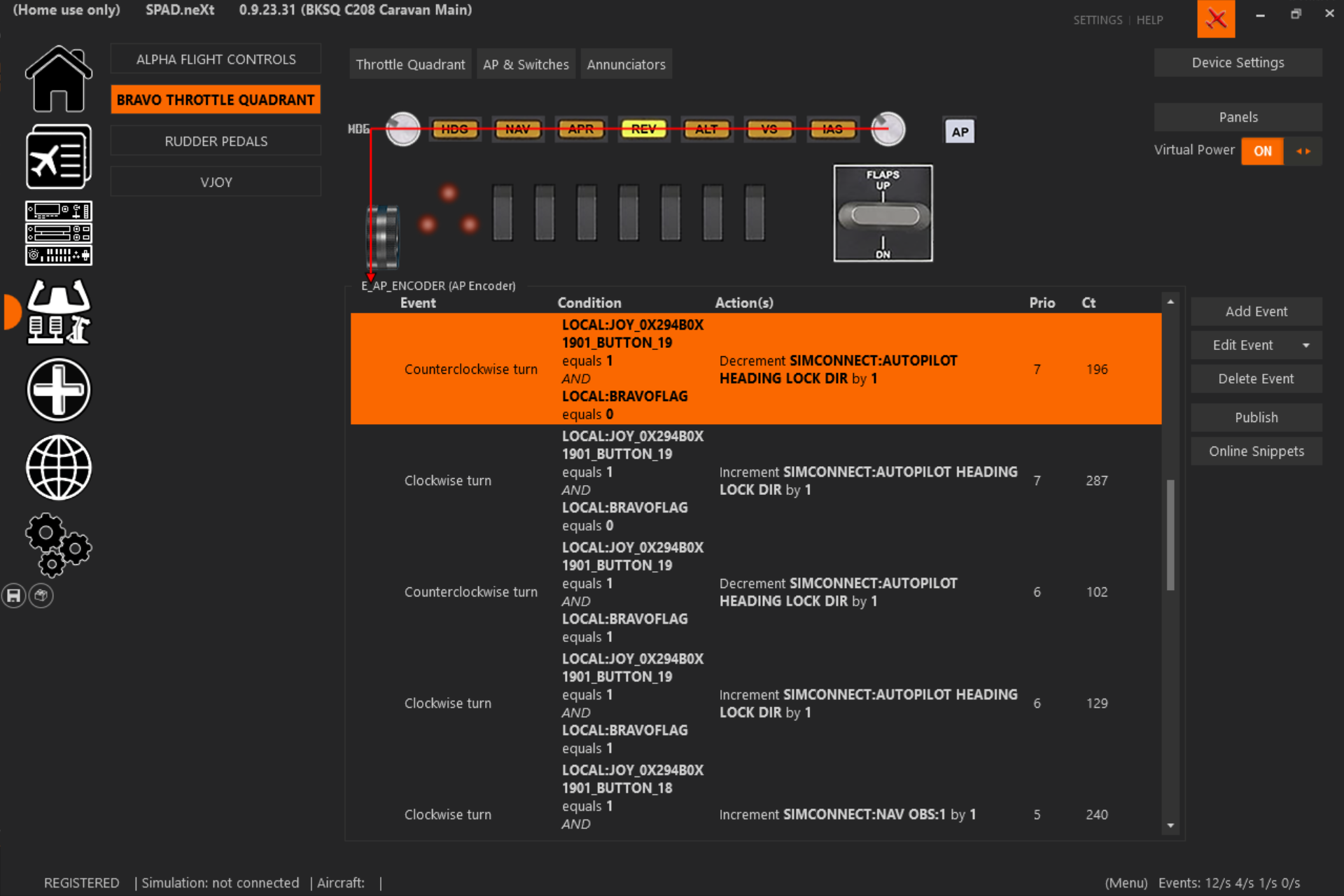
This is what I use. I use a HC Bravo, not sure what you use, but there is an inconsistency with the rotary knob. I've read it's more of a MS problem than a HC problem. That's why you see TWO sets of heading. One set is supposed to be 1 rotary knob click = 1 degree, the other set is supposed to be when you turn the rotary knob fast, 1 rotary knob = 5 degrees (or change the 5 to 10 for a bigger jump). That's where the inconsistency will get you though. Sometimes you only want to move it 1 degree but it'll jump 5, 10 or how many degrees you set it.
I hope I described that well and I hope this helps. This is what I use on virtually every aircraft I have.
-
Also, to make it easier on you. Click on the Airplane icon, underneath the house icon, then to the right of it you'll see Online Profiles, click that and you'll find a profile that someone else has made. Or click the Online Snippets button (right side of the image, middle screen that I posted above) and you can find snippets for just that specific button or knob.
-
Amazing - thank you! K:HEADING_BUG_SET worked brilliantly. I'm having so much fun with this plane.
@pbrad74 thanks also for the suggestion - I do usually check to see what profiles are available for my hardware, but profiles for minicockpit tend to be a bit sparse so I'm often having to build my own from scratch. -
Amazing - thank you! K:HEADING_BUG_SET worked brilliantly. I'm having so much fun with this plane.
@pbrad74 thanks also for the suggestion - I do usually check to see what profiles are available for my hardware, but profiles for minicockpit tend to be a bit sparse so I'm often having to build my own from scratch.@louise No problem. That's what I'm here for! Glad you're enjoying it.