
Garmin 430 pressure unit popup issue
-
Hello!
I'm trying to set up the Garmin 430 GPS for Europe Vatsim use. The controllers use the Milibar units (1013) while the unit defaults to Hg (2992). When navigating into the AUX menu to change the unit of measure, I have the following issue. The small popup with "Inches" and "Millibars" showing up, but the cursor is active on the layer behind. How can I navigate to the popup content? How Can I hide it? Restarting the whole avionics suite with the Master Avionics switch does not help. When coming back into the same function, the small popup is still there.
Also I would like to change the fuel and the weight units too inside the GPS for the trip and fuels calculation. Those use the same popup technique.
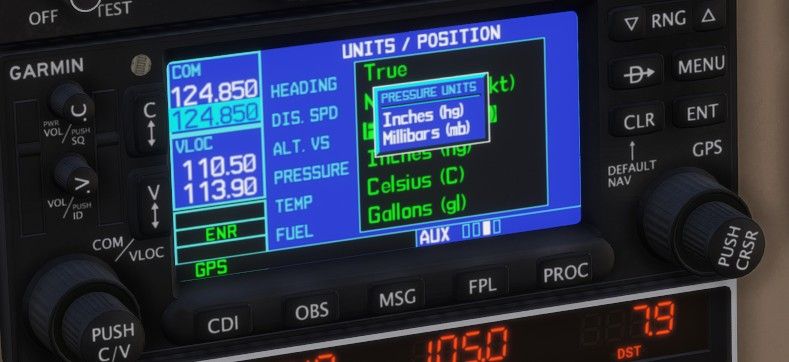
Program: MSFS2024 SU4.
Thanks
Gabor -
Hello!
I'm trying to set up the Garmin 430 GPS for Europe Vatsim use. The controllers use the Milibar units (1013) while the unit defaults to Hg (2992). When navigating into the AUX menu to change the unit of measure, I have the following issue. The small popup with "Inches" and "Millibars" showing up, but the cursor is active on the layer behind. How can I navigate to the popup content? How Can I hide it? Restarting the whole avionics suite with the Master Avionics switch does not help. When coming back into the same function, the small popup is still there.
Also I would like to change the fuel and the weight units too inside the GPS for the trip and fuels calculation. Those use the same popup technique.
Program: MSFS2024 SU4.
Thanks
Gabor@ggabor I recommend the Working Title discord channel for support to GNS530/430
https://discord.gg/p86UV9Rg -
Def. a WT question, but I haven't actually heard of anyone using a 430/530 for planning... The features are quite dated and tedious to use with much better options available. Not to mention it is probably faster doing the math with a napkin and calculator. I also can't understand why you would ever need to change the pressure units in the 430 or 530? The 430/530 in the sim are TSO-C146 and use WAAS for altitude so you don't have to enter an altimeter setting into them, the only thing I can think of is when using it for density altitude calculation and its faster to just check with an app or calculator for that too... To my Knowledge there isn't any way to get forecasting through NEXRAD on them IRL (nor would I ever use it for that) and if so it is definitely not simulated so you would have to enter everything in manually which sounds horrendous. IRL they're mainly just used for basic point to point RNAV and WAAS Approaches.
-
Def. a WT question, but I haven't actually heard of anyone using a 430/530 for planning... The features are quite dated and tedious to use with much better options available. Not to mention it is probably faster doing the math with a napkin and calculator. I also can't understand why you would ever need to change the pressure units in the 430 or 530? The 430/530 in the sim are TSO-C146 and use WAAS for altitude so you don't have to enter an altimeter setting into them, the only thing I can think of is when using it for density altitude calculation and its faster to just check with an app or calculator for that too... To my Knowledge there isn't any way to get forecasting through NEXRAD on them IRL (nor would I ever use it for that) and if so it is definitely not simulated so you would have to enter everything in manually which sounds horrendous. IRL they're mainly just used for basic point to point RNAV and WAAS Approaches.
@SadBucket Hello,
Thanks for your comments. You are right, navigating around the functionalities is really cumbersome for real world operations. ... I was just about experimenting the auxiliary functionalities of this unit, apart from following the magenta line.

