
I'm confused about some of the BKSQ variables.
-
I'll start with oil temp.
The manual says the correct Var is 'L:BKSQ_OIL_TEMP_1'
When setting up my Streamdeck I see the temp reported as 347.147If I use 'SIMCONNECT:ENG_OIL_TEMP' I see 74, which matches the oil temp gauge in the cockpit.
I have no idea what the correct math is to convert 347.147 to the C° number that shows up in the gauge.
So I just use the SIMCONNECT Var. But I'd prefer to use the BKSQ Var shown in the manual.
-
I believe this is the same circumstance as discussed here. I hope you will find that the units work correctly when converted from Kelvin! Let me know if they continue to cause you any trouble.
-
Thanks for the quick reply! It indeed appears to be the same issue.
I'll work on it later this week.I want to reiterate how much I LOVE this plane. It's my go-to, and once I get the SPAD programming done I'll get into the A36TC, and finally, the Baron Pro.
I own 13 Black Square aircraft, and as long as you keep building them, I will continue buying them.
-
Thanks for the quick reply! It indeed appears to be the same issue.
I'll work on it later this week.I want to reiterate how much I LOVE this plane. It's my go-to, and once I get the SPAD programming done I'll get into the A36TC, and finally, the Baron Pro.
I own 13 Black Square aircraft, and as long as you keep building them, I will continue buying them.
@eracer1111 said in I'm confused about some of the BKSQ variables.:
I own 13 Black Square aircraft
I'm glad someone is keeping count
 Thanks again, and let me know if there is ever anything else I can do for you!
 -
@eracer1111 said in I'm confused about some of the BKSQ variables.:
I own 13 Black Square aircraft
I'm glad someone is keeping count
Thanks again, and let me know if there is ever anything else I can do for you!I'm still working on my Bonanza Pro Streamdeck buttons. I created a SPAD event that tests most of the circuit breaker conditions and changes the button color from green to red when any of the breakers are tripped, and from red to green when they are reset.
I found the Vars for all of them except:
Aux Fuel Pump
Vent Blowers
Air Cond
Air Cond Blower
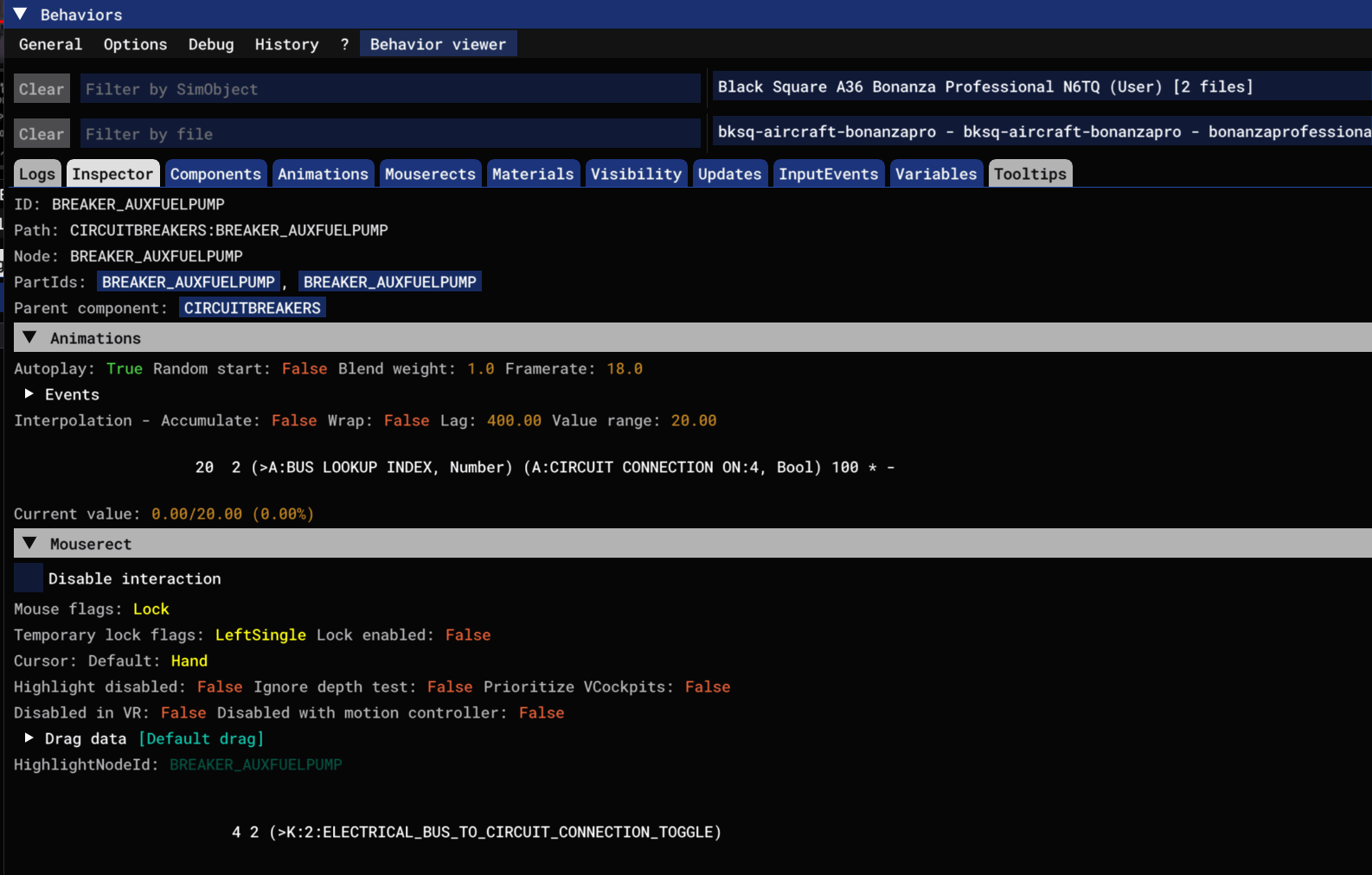
STBY GyroHere's what I see when I look at the Aux Fuel Pump. I can find the 'A:Circuit Connection On:4' variable, but it doesn't respond when I manually trip the breaker. I'm not sure SPAD can control A-Vars.
Any help figuring this out is appreciated.
-
I couldn't edit the last post (3600 second limit...)
I started the plane, turned the Fuel Pump on, watched the status of the variable 'A:CIRCUIT CONNECTION ON:4' in Data Monitor, and tripped the breaker. That A-Var is a standard Simconnect variable, so I should see it changing. There was no change.Tripping the breaker shut the pump off, so I know it's interrupting the circuit.
I need to be able to monitor the breaker status, and can't see how. -
I'm a little stumped on this one, so forgive me if I start with the basics:
The CIRCUIT CONNECTION ON variable is predicated on the BUS LOOKUP INDEX variable. The latter is used to tell the former what "connection" it should be testing for (i.e. is circuit X connected to bus Y). Are you setting BUS LOOKUP INDEX before trying to read from CIRCUIT CONNECTION ON? If not, then I'm surprised that any of the others are working already. However, the fuel pump is on the same bus as all the others, so I don't know why it alone wouldn't work. That's why I'm stumped.
However, there is a foolproof way to get the states of the breakers, but you have to add some code to the BonanzaProfessional_Base_INT.XML. If you just want to get this working ASAP, then you can add...
<EXPORT_LVAR>TRUE</EXPORT_LVAR>...after the line...
<CIRCUIT_ID>@FuelPumpCircuit</CIRCUIT_ID>The value of the breaker will then be available at
L:var_Breaker_AuxFuelPump_readonly.Let me know if that works for you, and if you have any more questions!
-
I'm a little stumped on this one, so forgive me if I start with the basics:
The CIRCUIT CONNECTION ON variable is predicated on the BUS LOOKUP INDEX variable. The latter is used to tell the former what "connection" it should be testing for (i.e. is circuit X connected to bus Y). Are you setting BUS LOOKUP INDEX before trying to read from CIRCUIT CONNECTION ON? If not, then I'm surprised that any of the others are working already. However, the fuel pump is on the same bus as all the others, so I don't know why it alone wouldn't work. That's why I'm stumped.
However, there is a foolproof way to get the states of the breakers, but you have to add some code to the BonanzaProfessional_Base_INT.XML. If you just want to get this working ASAP, then you can add...
<EXPORT_LVAR>TRUE</EXPORT_LVAR>...after the line...
<CIRCUIT_ID>@FuelPumpCircuit</CIRCUIT_ID>The value of the breaker will then be available at
L:var_Breaker_AuxFuelPump_readonly.Let me know if that works for you, and if you have any more questions!
@Black-Square
Thank you.I requested some help for this one on the SPAD Discord. One of the gurus over there mentioned this:
Q: "How can I retrieve the value of the 2nd simvar (circuit...) if there is the following in behaviour view:
(>A:BUS LOOKUP INDEX, Number) (A:CIRCUIT BREAKER PULLED:15, Bool)"A: "Double indexed data is not available via Simconnect. If want to read it , that's currently not possible without rpn coding."
I asked for an explanation of RPN Coding, since I don't know what that is. Haven't heard back yet.
Here's a list of all the breakers I am able to monitor.
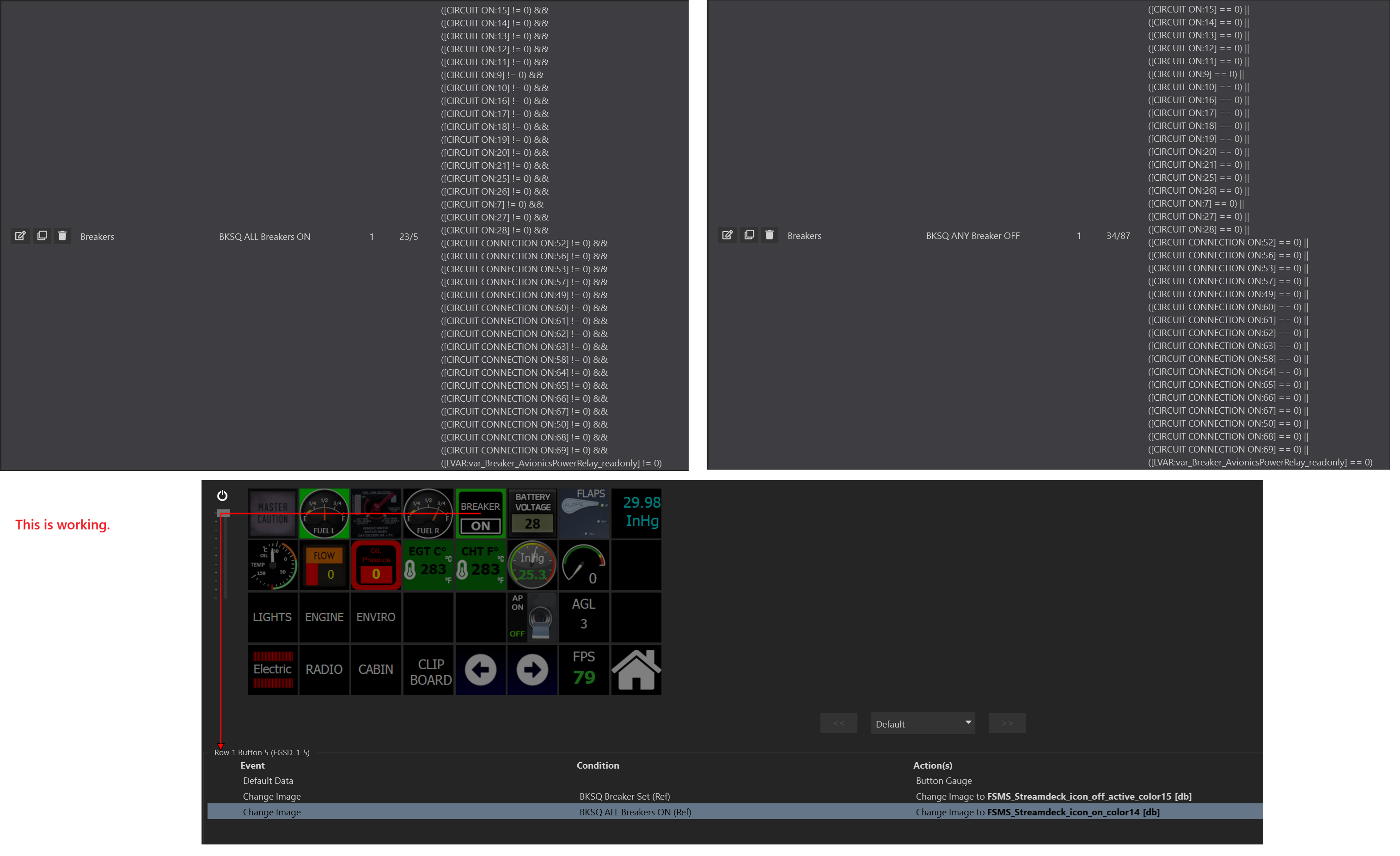
It is puzzling why 'Aux Fuel Pump' (A:CIRCUIT CONNECTION ON:4) isn't returning a status, but 'Oil Temp/Press' (A:CIRCUIT CONNECTION ON:15) is. I don't preset the Index in either case.
In the meantime I will edit the XML and let you know!
-
Well this was interesting. I restored the original XML and the cockpit is back to normal.
I searched for <CIRCUIT_ID>@FuelPumpCircuit</CIRCUIT_ID> in the 'BonanzaProfessional_Base_INT.XML' and only found one instance (Line 10226) Did I miss something?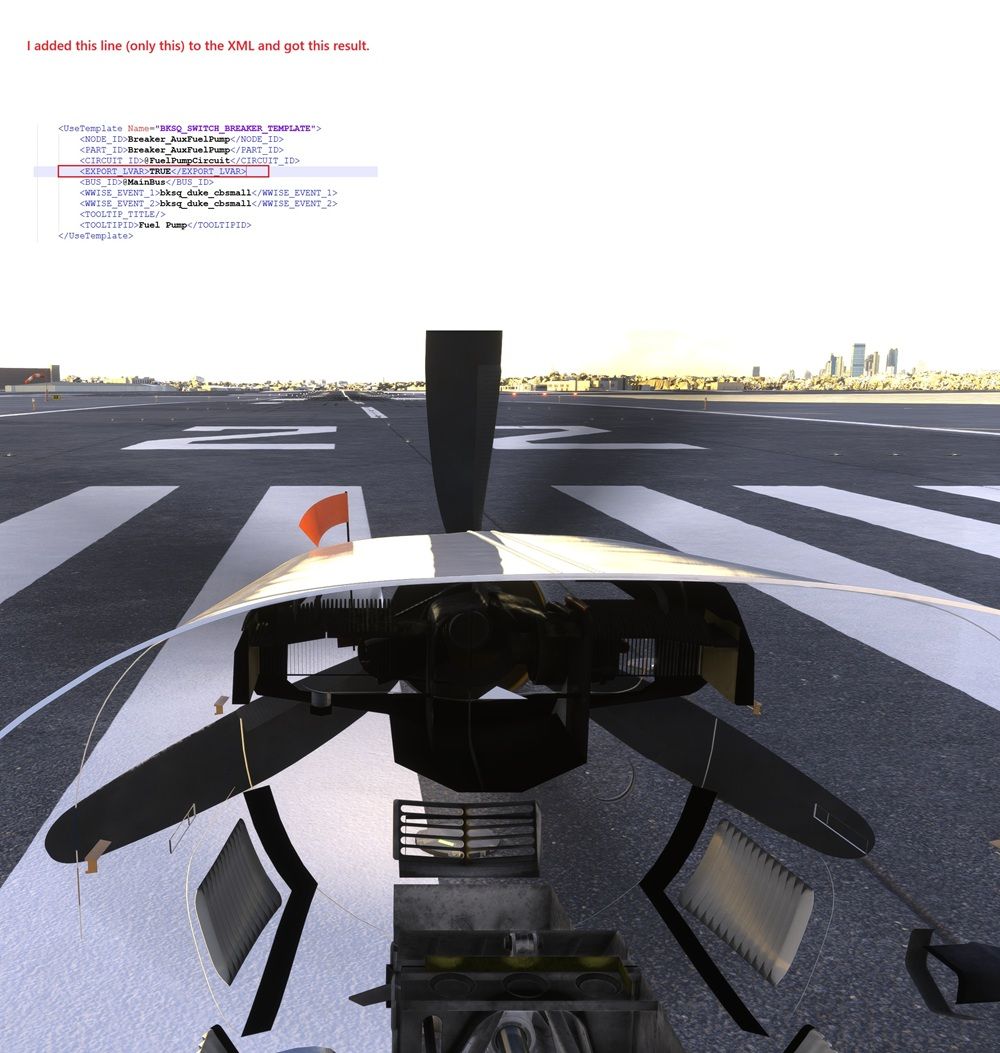
-
Eugh. That's probably MSFS 2024 being up to it's new tricks. I've yet to figure out when it does this for some users, and sometimes not for others, but it seems that sometimes MSFS 2024 enforces the encoded package size as a form of software "safety". You can download this program, and drag-and-drop "layout.json" from the root of the package directly on top of the program. It will run in a fraction of a second and encode a new package size. Sorry for the extra step. Let me know if that fixes it.
-
@Black-Square
Thanks for the quick reply. I want to clear about the steps before I do this.
When you say "drop the .json on top of the program" do you mean the sim's .exe file?
There are two in the \content folder that will launch the sim:flightsimulator2024.exe
gamelaunchhelper.exeI use the latter with a -fastlaunch switch.
Or are you saying to drop the 'layout.json' file somewhere else?
-
I'm glad you clarified. I mean the exe that comes from the download link in my last message. That's a tiny program that rebuilds the layout.json with any changes you have made. Again, sorry for the extra step. I've never been able to determine why this is necessary for some users and not others. It makes it difficult to tell, since many users who edit files are already familiar with MSFSLayoutGenerator.exe, so they run it every time, whether prompted or not. Anyway, let me know if you have any other questions!
-
Thank you! I'll let you know how it goes.
Microsoft definitely does their own thing. I try to remind people on the forum that creating an aircraft model isn't simple - especially for MSFS 2024. Some folks think updates from FS20 versions to FS24 should all be free. They have no idea the amount of work involved, especially when faced with a new SDK and Microsoft's DRM strategies.For that reason alone I can't imagine chasing down problems that happen to some folks, but not to others. So many variables affect how things integrate. Thanks again for a great plane!
-
It worked. Thanks!
I edited the XML, dropped layout.json onto MSFSLayoutGenerator.exe, launched the sim, and the cockpit looks normal. I can monitor the status with 'L:var_Breaker_AuxFuelPump_readonly'
Perfect!
I'm going to try it with the other breakers I'm having an issue with.
Aux Fuel Pump (FIXED)
Vent Blowers
Air Cond
Air Cond Blower
STBY GyroI assume I need to drop the layout.json onto the 'program' after every XML edit?
EDIT: So I edited the XML 'VentBlowers' section to add the Export line:
<CIRCUIT_ID>@VentBlowersCircuit</CIRCUIT_ID>
EXPORT_LVAR>TRUE</EXPORT_LVAR>Got the same partial cockpit.
- So I dropped layout.json on the 'program' again, but that did not fix the cockpit.
- I took the new line out of the XML and the cockpit returned to normal.
- I added the EXPORT line back in after the 'VentBlower' Circuit ID and didn't drop the JSON, and got the partial cockpit.
- Now I'm back to just having the EXPORT line after the 'AuxFuel' Circuit ID line, and the cockpit is back to normal.
I'm still trying to get the other breakers to return a status. Your method worked for one, but not for more than one.
Please understand that while I'm comfortable (and careful) editing XML files, I don't know the language.
As always, thanks for your help.
-
It worked. Thanks!
I edited the XML, dropped layout.json onto MSFSLayoutGenerator.exe, launched the sim, and the cockpit looks normal. I can monitor the status with 'L:var_Breaker_AuxFuelPump_readonly'
Perfect!
I'm going to try it with the other breakers I'm having an issue with.
Aux Fuel Pump (FIXED)
Vent Blowers
Air Cond
Air Cond Blower
STBY GyroI assume I need to drop the layout.json onto the 'program' after every XML edit?
EDIT: So I edited the XML 'VentBlowers' section to add the Export line:
<CIRCUIT_ID>@VentBlowersCircuit</CIRCUIT_ID>
EXPORT_LVAR>TRUE</EXPORT_LVAR>Got the same partial cockpit.
- So I dropped layout.json on the 'program' again, but that did not fix the cockpit.
- I took the new line out of the XML and the cockpit returned to normal.
- I added the EXPORT line back in after the 'VentBlower' Circuit ID and didn't drop the JSON, and got the partial cockpit.
- Now I'm back to just having the EXPORT line after the 'AuxFuel' Circuit ID line, and the cockpit is back to normal.
I'm still trying to get the other breakers to return a status. Your method worked for one, but not for more than one.
Please understand that while I'm comfortable (and careful) editing XML files, I don't know the language.
As always, thanks for your help.
@eracer1111 Just once after you've made all your edits. Glad that works for you. The engineer in me wants to know why the other ones are working when they kind of shouldn't be, but I will just be happy that you have a solution that works for you. You hit the nail on the head with your previous message. The same thing that makes me rage against the complexity is also what makes me provide custom solutions like this for my users. I know that I have developed tricks that might completely stymie someone else, so I always provide the fastest possible solution that I can, even if it means editing local files. I'm always happy to answer any more questions!
-
-
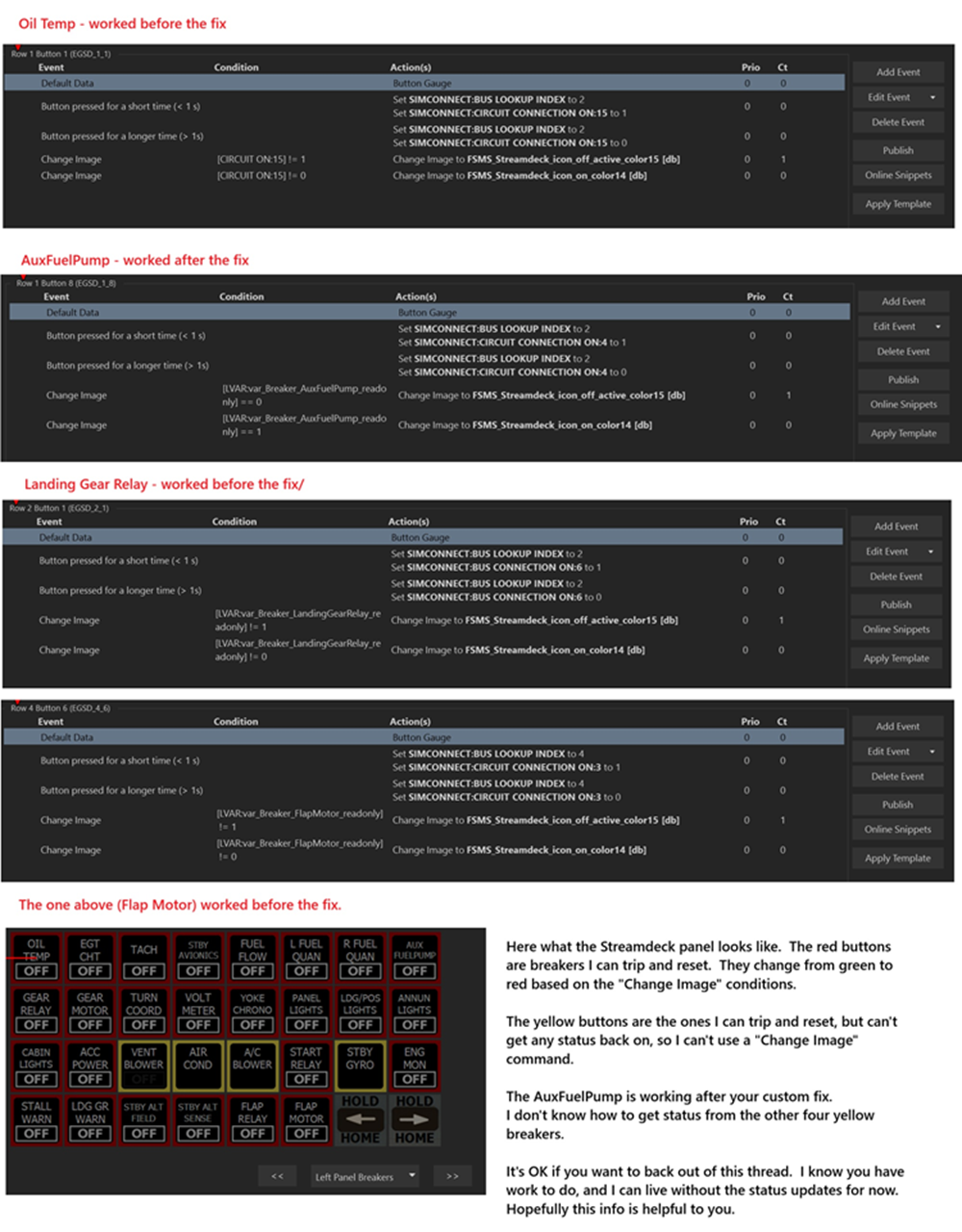
The simplest solution would be to add the EXPORT_LVAR line to every breaker component in the XML. This sound tedious, but with the right text editor, or even a clever find/replace, it could be done in seconds. Like I said, there is kind of no reason that the other ones should be working, so I'm not surprised to find that they might be inconsistent. I never back down from a fight with my software, so you let me know what else I can do to help you
-
That made me laugh. Years ago my main job was building and fixing client video editing computers. My mantra was, "No computer has ever, or will ever defeat me!"
I'll keep working on this, because I still have that "Never give up, never surrender!" mentality.
I just wish I knew more about why things with this sim work the way they do (and sometimes don't.)
-
That made me laugh. Years ago my main job was building and fixing client video editing computers. My mantra was, "No computer has ever, or will ever defeat me!"
I'll keep working on this, because I still have that "Never give up, never surrender!" mentality.
I just wish I knew more about why things with this sim work the way they do (and sometimes don't.)
@eracer1111 By Grabthar's hammer, you shall be avenged!
-
@eracer1111 By Grabthar's hammer, you shall be avenged!
OK, I added EXPORT_LVAR to all the Breakers, then dropped layout.json onto the 'Program' and everything is great! All the readonly vars for all the breaker were exposed, and I'm using them to return status.
One exception though, and I'm sure it's a misunderstanding on my part. 'Cabin Lights' has 6 Circuit ID's.
To trip the breaker I set them all to 0, and to reset them I set them all to 1.<UseTemplate Name="BKSQ_SWITCH_BREAKER_TEMPLATE_MULTI_6">
NODE_ID>Breaker_CabinLights</NODE_ID>
<PART_ID>Breaker_CabinLights</PART_ID>
<CIRCUIT_ID_1>@CabinLight1Circuit</CIRCUIT_ID_1>
<EXPORT_LVAR>TRUE</EXPORT_LVAR>
<BUS_ID_1>@MainBus</BUS_ID_1>
<CIRCUIT_ID_2>@CabinLight2Circuit</CIRCUIT_ID_2>
<EXPORT_LVAR>TRUE</EXPORT_LVAR>
<BUS_ID_2>@MainBus</BUS_ID_2>
<CIRCUIT_ID_3>@CabinLight3Circuit</CIRCUIT_ID_3>
<EXPORT_LVAR>TRUE</EXPORT_LVAR>
<BUS_ID_3>@MainBus</BUS_ID_3>
<CIRCUIT_ID_4>@CabinLight4Circuit</CIRCUIT_ID_4>
<EXPORT_LVAR>TRUE</EXPORT_LVAR>
<BUS_ID_4>@MainBus</BUS_ID_4>
<CIRCUIT_ID_5>@CabinLight5Circuit</CIRCUIT_ID_5>
<EXPORT_LVAR>TRUE</EXPORT_LVAR>
<BUS_ID_5>@MainBus</BUS_ID_5>
<CIRCUIT_ID_6>@CabinLight6Circuit</CIRCUIT_ID_6>
<EXPORT_LVAR>TRUE</EXPORT_LVAR>
<BUS_ID_6>@MainBus</BUS_ID_6>
<WWISE_EVENT_1>bksq_duke_cbsmall</WWISE_EVENT_1>
<WWISE_EVENT_2>bksq_duke_cbsmall</WWISE_EVENT_2>
<TOOLTIP_TITLE/>
<TOOLTIPID>Cabin Lights</TOOLTIPID>
</UseTemplate>But I only see 1 readonly LVAR for CabinLights, and I'm not getting the image change when it changes with the Circuit.


