Skip to content
  • Categories
  • Recent
  • Tags
  • Popular
  • Users
Collapse
Just Flight Community Forum
  1. Home
  2. Just Flight
  3. MSFS Products
  4. F28 Professional
  5. Blurry Dials F28

Blurry Dials F28

Scheduled Pinned Locked Moved F28 Professional
3 Posts 2 Posters 826 Views 1 Watching
  • Oldest to Newest
  • Newest to Oldest
  • Most Votes
Reply
  • Reply as topic
Log in to reply
This topic has been deleted. Only users with topic management privileges can see it.
  • A Offline
    A Offline
    Arek5
    wrote on last edited by
    #1

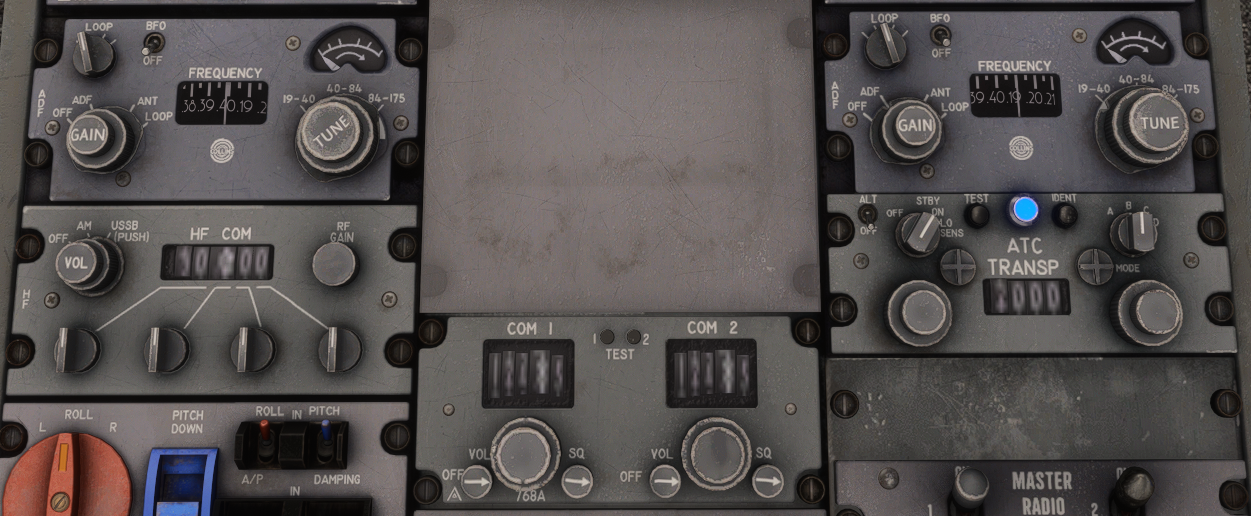
    Hello I just want to report that I have been getting blurry numbers on the central pedestal. This is happening randomly. At first the textures are crisp then within a second they become blurry and slowly improve, then the process repeats. blur.png

    1 Reply Last reply
    0
    • MarkM Offline
      MarkM Offline
      Mark
      JF Staff
      wrote on last edited by
      #2

      This is something we have seen on our side too, and unfortunately, it's something that is being controlled by MSFS 2024 itself when the camera is moved a certain distance away from the textures. We have looked into a few workarounds, but haven't been able to find a suitable solution yet. We are continuing to monitor this, and we'll check it again once the upcoming sim update(s) release.

      Mark - Just Flight
      Just Flight Development Assistant

      1 Reply Last reply
      1
      • A Offline
        A Offline
        Arek5
        wrote last edited by
        #3

        Hey any news about this. It is the most annoying thing about the F28.

        1 Reply Last reply
        0
        Reply
        • Reply as topic
        Log in to reply
        • Oldest to Newest
        • Newest to Oldest
        • Most Votes


        • Login

        • Don't have an account? Register

        • Login or register to search.
        • First post
          Last post
        0
        • Categories
        • Recent
        • Tags
        • Popular
        • Users