Skip to content
  • Categories
  • Recent
  • Tags
  • Popular
  • Users
Collapse
Just Flight Community Forum
  1. Home
  2. Just Flight
  3. MSFS Products
  4. FS Traffic
  5. aircraft will not take off from LFML

aircraft will not take off from LFML

Scheduled Pinned Locked Moved FS Traffic
6 Posts 3 Posters 2.2k Views 1 Watching
  • Oldest to Newest
  • Newest to Oldest
  • Most Votes
Reply
  • Reply as topic
Log in to reply
This topic has been deleted. Only users with topic management privileges can see it.
  • H Offline
    H Offline
    hunterdouglas
    wrote on last edited by
    #1

    I suspect that it's a FS2020 problem with runways/taxiway holding points but it's annoying to me and there might be a solution.
    I'm at LFML and aircraft taxi and land but will not take off.
    They head towards 31R line up on the holding point before the runway but thats it, they stop and build up there and eventually disappear but they never take off. Is this a FS2020 problem with the runways/taxiway holding points.
    In FSX there was a program where we could get in and modify these problems.
    Can this be solved ?

    1 Reply Last reply
    0
    • MarkM Offline
      MarkM Offline
      Mark
      JF Staff
      wrote on last edited by
      #2

      Unfortunately, that does sound like an issue with the taxiway paths that the Ai traffic uses to navigate around the airport.

      The easiest solution for this is to see if there are any freeware or payware third-party sceneries available for LFML that may have fixed the taxiway issue. There is also the 'MSFS World Hub' which is currently in beta testing, which when released, will allow the community to fix these types of issues with the default MSFS airports and they will then be included as part of the base game.

      There is also the Airport Design Editor (ADE) tool that can be used to build and edit airports outside of the MSFS SDK. I personally don't have any experience with ADE, but the FSDeveloper forum should be able to offer assistance if you choose to go down this route: https://fsdeveloper.com/forum/threads/ade-2020-alpha-21-hf5.455259/

      Mark - Just Flight

      Just Flight Development Assistant

      1 Reply Last reply
      1
      • K Offline
        K Offline
        Kano
        wrote last edited by
        #3

        Has this been answered /fix already? If not, I may have found the solution, pretyty simple.

        Cheers

        Kano

        1 Reply Last reply
        0
        • H Offline
          H Offline
          hunterdouglas
          wrote last edited by
          #4

          what is your answer please?

          1 Reply Last reply
          0
          • K Offline
            K Offline
            Kano
            wrote last edited by
            #5

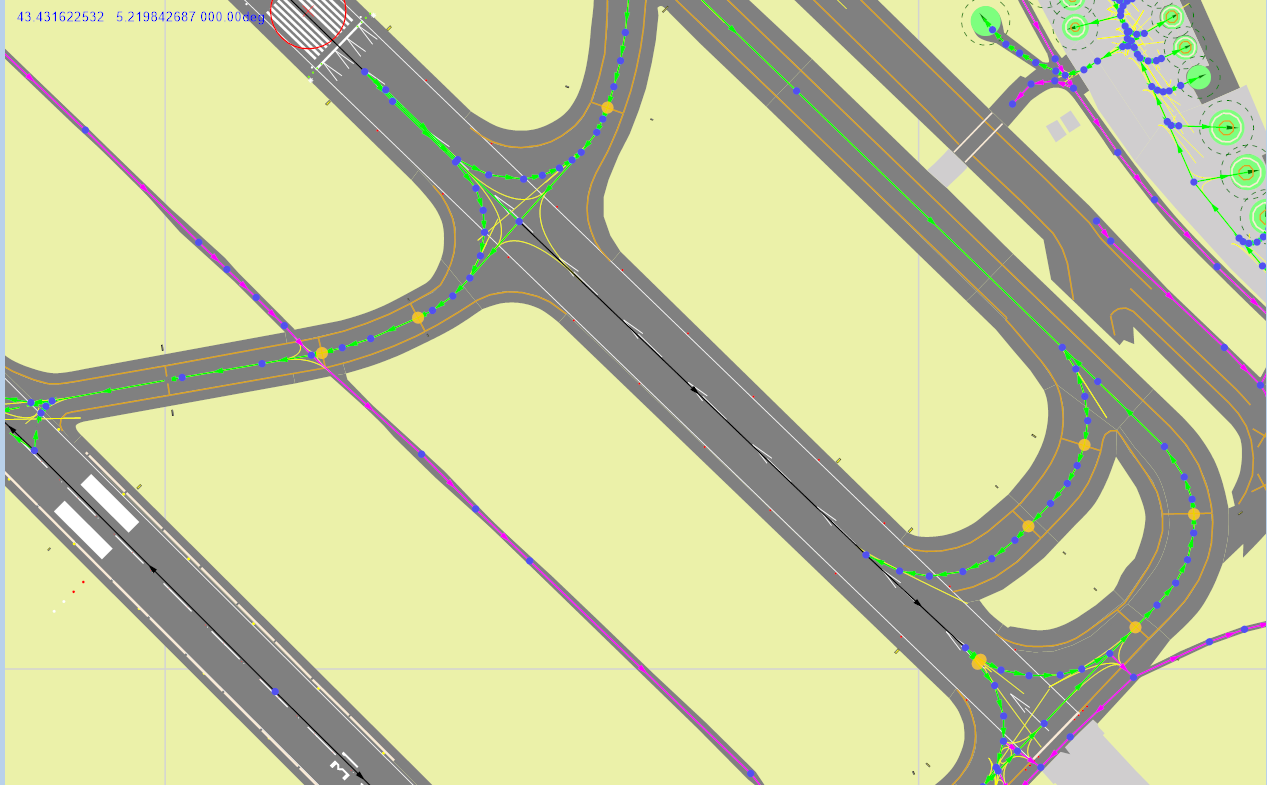
            The MSFS default airpor has a pitfall in RWY31R. It has two Hold Short points with in the rwy, at the very very begining, If you remove them, sorted.
            Know how to do it?

            1 Reply Last reply
            0
            • K Offline
              K Offline
              Kano
              wrote last edited by
              #6

              If you look closely, I have highlighted in yellow all the hold short point in RWY31R. You can see the two I'm talking about at very end of the rwy, are the ones very close together. That is confusing the AI aircraft and ATC, that eventually, does not give the clearance and the aircraft end up disappearing. If a developer is using this part of the default airport, it will inherit the issue.
              Screenshot 2026-05-30 202924.png

              1 Reply Last reply
              0
              Reply
              • Reply as topic
              Log in to reply
              • Oldest to Newest
              • Newest to Oldest
              • Most Votes


              • Login

              • Don't have an account? Register

              • Login or register to search.
              • First post
                Last post
              0
              • Categories
              • Recent
              • Tags
              • Popular
              • Users