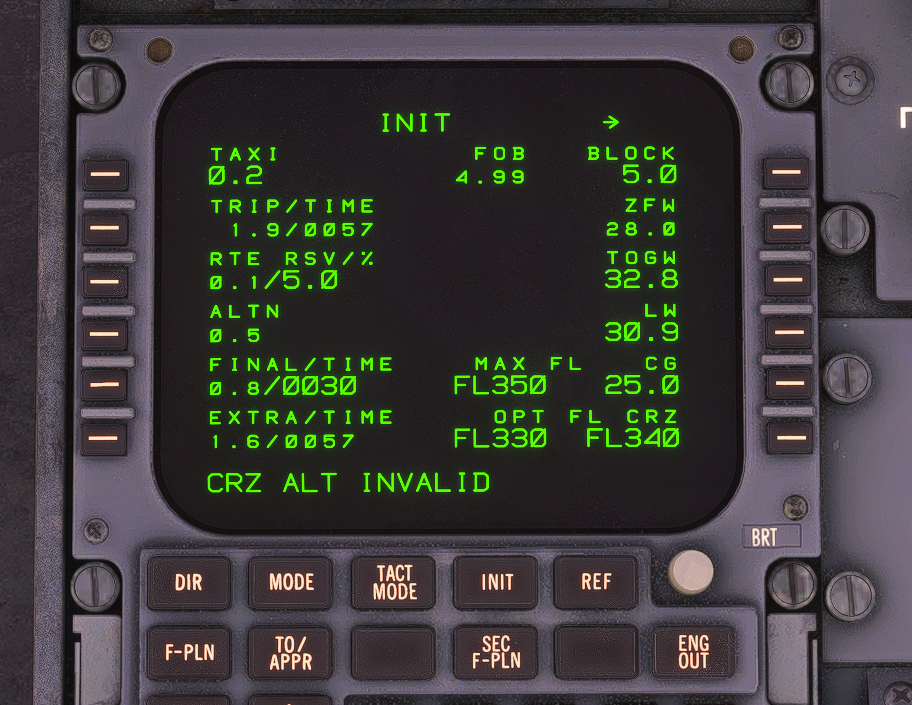
Crz alt invalid
-
Every flight once i get to cruise altitude I keep getting a "CRZ ALT INVALID" on the FMS, ive tried not going with the simbrief given 35,000FL and trying 28,000FL incase its getting to T/C too close to T/D but it still does it, once i get the CRZ ALT INVALID it removes my top of descent from the FMS waypoint. Ive tried fixing it my past 4 or 5 flights but it happens everytime, anyone have a solution to what im doing wrong?
-
I have now reinstalled the F100 and deleted its WASM folder, will try another flight with it later to see if the issue remains
-
Thank you for the feedback. For any AFCAS/ATS related feedback, could I kindly ask you to raise a support ticket with Just Flight Support at the following link: https://www.justflight.com/support
The F70 & F100 Professional are complex products, so in order to give our support team the best chance at offering speedy assistance, and for any potential bugs to get properly logged and addressed, could you please include any screenshots/videos of the behaviour with your ticket, as well as attaching the log file generated by the product.
Instructions for locating the log file can be found here: https://support.justflight.com/en/support/solutions/articles/17000152594-where-to-find-the-log-file-s-
Mark - Just Flight
-
The problem had started happening when i joined the SU6 beta, it also gave me issues with the sovereign, switching back to SU5 fixed the sovereign but not the F100, I did a fresh install of MSFS 24 on SU5 today and managed to do a F100 without the issue.
-
Same here, CRZ ALT INVALID flying FAEL-FAKN lightly loaded with a CRZ FL330.
The CRZ LVL INVALID appeared only once we had levelled off at an intermediate altitude due ATC, nevertheless, the aircraft then simply refused to return to PRF mode when ATC instructed me to continue my climb at which point the message appeared.
I again simply switched off as there's no point in flying this product like this.
My earlier ticket (MDPC to TUPJ or TAPA) on this exact issue remains unresolved.
-
 Believe I've found a workaround to this annoying bug!!! It seems to have to do with the altimter qnh/std button. I've been flying in areas mostly with very low transition altitudes (3,000 ft or so) and have been putting this button into STD. Don't do this. If you spin the altitude window up with it in standard, it will give you the invalid cruise message, and you can't engage profile. The solution I've found is as follows:
-
Just leave the button in QNH and manually set the altimeter
-
If you do switch to STD, but level off at an intermediate altitude before cruise, you must reselect QNH, then on the PROG page of the FMC, change the cruise altitude to the altitude currently selected in the autopilot (i.e. 12,000). I was able to successfully reengage PROF. I could then switch back to STD and it would stay.
Curious to hear if this helps anybody else.
-
-
Just want to follow up if it helps anybody. Haven't had this in a while. My earlier method proved to not work sometimes. I've been doing two other things consistently, and so far I've had good luck.
-
Make sure you press the STD button BEFORE you click the screw hotspot to standarize the backups. It doesn't seem to like the other way around, and causes a glitch in the STD button.
-
I was flying in the Caribbean so I had the aircraft configured for fuel in pounds but altimeters in hPa. Ever since I forced the aircraft config ini files to be in pounds AND inHG for the altimeter, no problems. Perhaps it was this "mix-match" of imperial and metric units confusing the FMC.
-