
Bug report "FLIPCHART WT SYNC"
-
It is not possible to select gross weight on the flipchart, if you load the plane like in the picture selected the first time
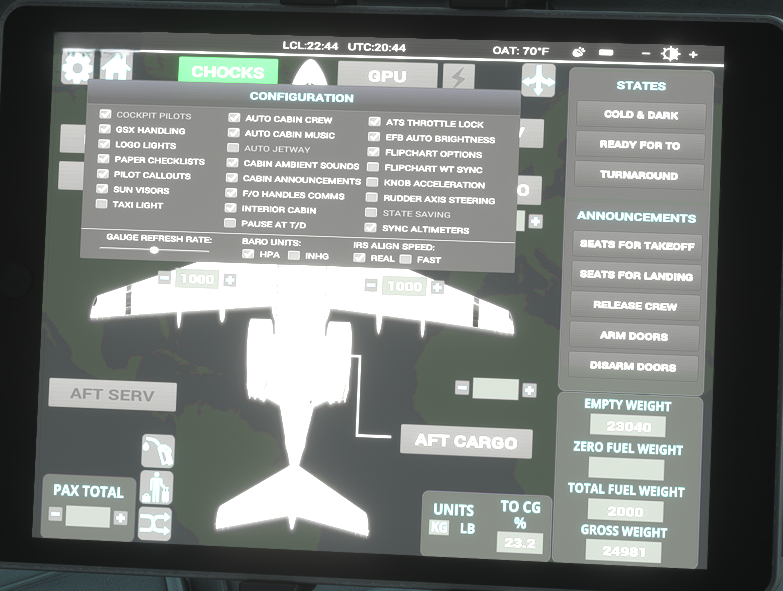
if i select and deselect the "FLIPCHART WT SYNC" one time the arrows for manual gross weight selection works. To make this bug repeatable it is important to deselect the "FLIPCHART WT SYNC" option, restart sim, load the plane and try to change weight.
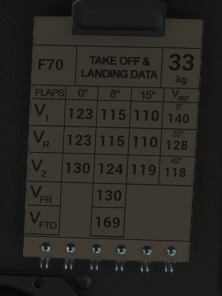
The same bug existing in the f28, and i reported it there to. Iam sad that it was useless and even this new report is questionable.
-
I have just been testing this, and I am unable to replicate this behaviour. I canable to adjust the weights on the flipchart if a flight is loaded with the FLIPCHART WT SYNC option disabled.
I know I personally tested and verified this was fixed during beta testing of the F70 & F100 Professional based on previous feedback reported on our other products, so I can assure you no feedback is "useless".
If you could kindly raise a ticket with Just Flight Support and provide exact steps on how to reproduce this, we can then look into this further: https://www.justflight.com/support
Mark - Just Flight
-
This is weird. If i click on the flipchart nothing happen and i even can hear the soundanimation with rotating paper but the value stays fixed. A fast select and deselect of the option and all is well. I mean i have no alien installation and so far nobody else have this. My steps are
-deselect the the option " FLIPCHART WT SYNC" in the efb
-shutdown msfs 2024
-start msfs 2024
-freeflight select F100/F70/F28
-try to flip wt on the paperchart and i get soundanimation but no change in value
-quick jump in the efb, select/deselect the option and all is fineIam no ticket fan becaus i have to much of it on my workplace. So this report is the best i can do. But if realy no one else can confirm this behavior...well so i still have the alien theory

