Skip to content
  • Categories
  • Recent
  • Tags
  • Popular
  • Users
Collapse
Just Flight Community Forum
  1. Home
  2. Just Flight
  3. MSFS Products
  4. RJ Professional
  5. MSFS2024 Product Status and Navigraph Question

MSFS2024 Product Status and Navigraph Question

Scheduled Pinned Locked Moved RJ Professional
1 Posts 1 Posters 5 Views 1 Watching
  • Oldest to Newest
  • Newest to Oldest
  • Most Votes
Reply
  • Reply as topic
Log in to reply
This topic has been deleted. Only users with topic management privileges can see it.
  • M Offline
    M Offline
    Mikey
    wrote last edited by
    #1

    I've been flying the RJ70 in MSFS2020 and it works fine.
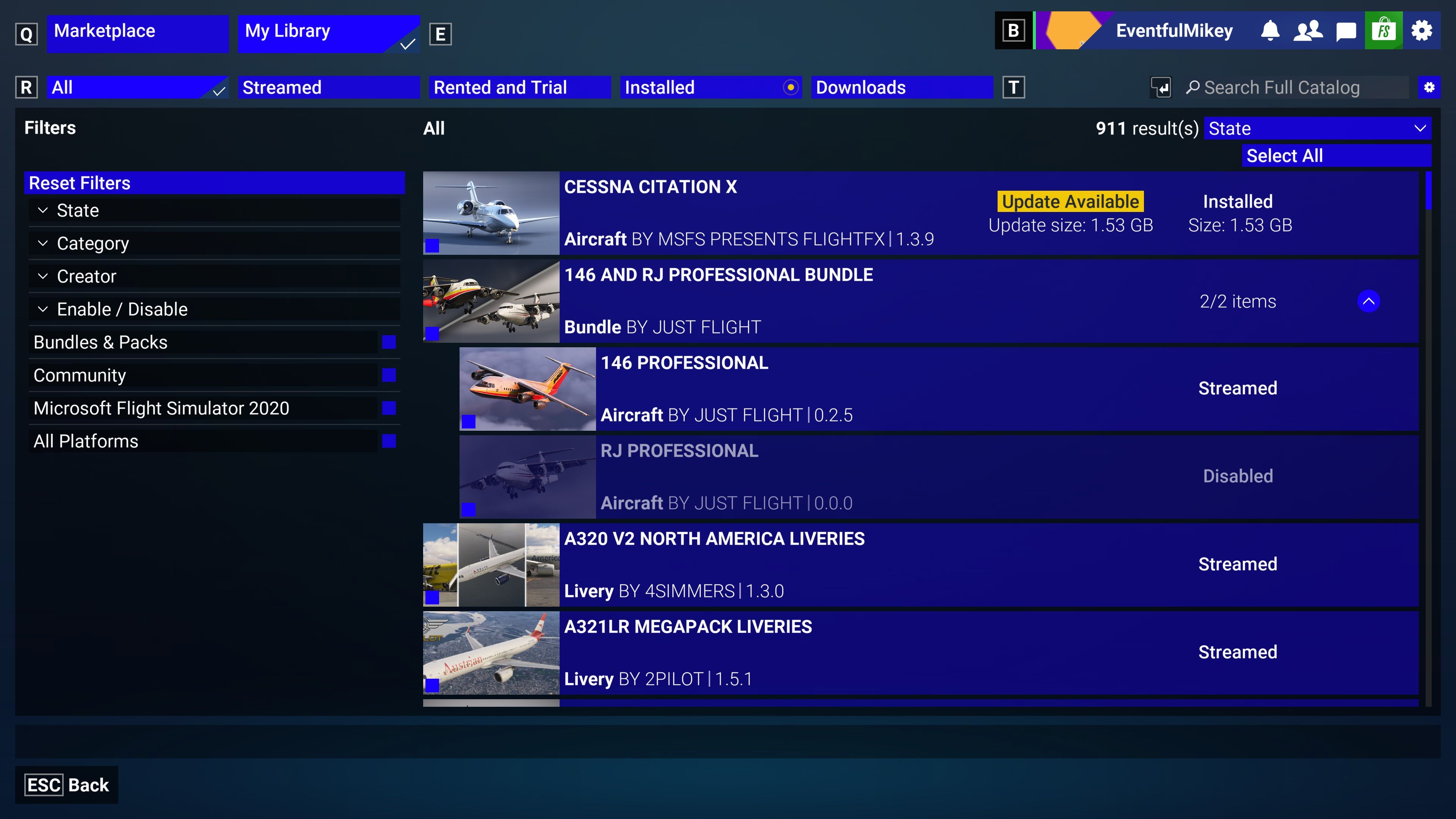
    However, in MSFS2024, I noticed that the FMS was not using the latest Navigraph AIRAC 2605. I read another post that recommended uninstalling/reinstalling RJ Professional, but that was for FS20. When I look at the product in My Library, I see the 146 AND RJ PROFESSIONAL BUNDLE. That line can be expanded. I see the 146 PROFESSIONAL is being streamed so I assume the latest version is always loaded. Also, it shows "Aircraft BY JUST FLIGHT | 0.2.5". Is this the version? Doesn't look right.
    Also, I see a line for RJ PROFESSIONAL that is disable. Why would it be disabled? I loaded it and started preflighting the plane when I noticed that Navigraph data was not the latest.
    In FS24, how does one uninstall/reinstall a product that is being streamed? What can I do about RJ being disabled?
    I have found no other problems with other planes in FS24.Microsoft Flight Simulator 2024 Screenshot 2026.05.26 - 17.25.11.84.jpg
    1 Reply Last reply
    0
    Reply
    • Reply as topic
    Log in to reply
    • Oldest to Newest
    • Newest to Oldest
    • Most Votes


    • Login

    • Don't have an account? Register

    • Login or register to search.
    • First post
      Last post
    0
    • Categories
    • Recent
    • Tags
    • Popular
    • Users