Skip to content
  • Categories
  • Recent
  • Tags
  • Popular
Collapse
Just Flight Community Forum
  1. Home
  2. Comments, Feedback & Suggestions
  3. JF Forum Dark Mode / Theme

JF Forum Dark Mode / Theme

Scheduled Pinned Locked Moved Comments, Feedback & Suggestions
8 Posts 4 Posters 1.1k Views 1 Watching
  • Oldest to Newest
  • Newest to Oldest
  • Most Votes
Reply
  • Reply as topic
Log in to reply
This topic has been deleted. Only users with topic management privileges can see it.
  • M
    M
    Mustang
    wrote on last edited by
    #1

    Is there any possibility to set up a dark mode theme for this forum?

    The vast whiteness is not so pleasant to read when I should probably already be asleep and my bright monitor is keeping me awake, despite being heavily dimmed and with Night Mode enabled.

    Thanks for the consideration!

    Regards,
    Martyn

    1 Reply Last reply
    2
    • YankeeTendy35Y
      YankeeTendy35Y
      YankeeTendy35
      wrote on last edited by
      #2

      This would be great!

      1 Reply Last reply
      0
      • F
        F
        F737MAX
        wrote on last edited by
        #3

        I use the extension 'Dark Reader' in the Mozilla Firefox browser.

        Turns all website pages to dark mode, unless you turn it off or disable it for specific websites.

        M 1 Reply Last reply
        0
        • F F737MAX

          I use the extension 'Dark Reader' in the Mozilla Firefox browser.

          Turns all website pages to dark mode, unless you turn it off or disable it for specific websites.

          M
          M
          Mustang
          wrote on last edited by
          #4

          @F737MAX Good tip, thanks. I'll add it to my small collection of useful Firefox extensions!

          1 Reply Last reply
          0
          • ch0llisC
            ch0llisC
            ch0llis
            JF Staff
            wrote on last edited by
            #5

            You should now see dark/night styling automatically based on the options configured in your browser/system.

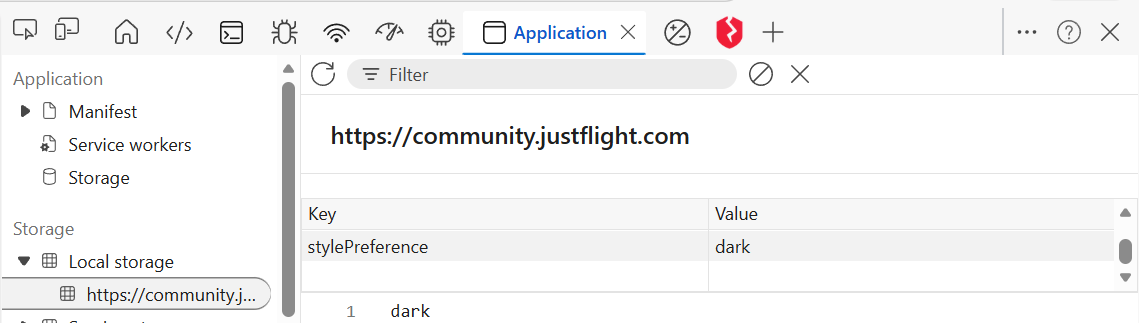
            If you wish to override the light/dark styling without changing your browser or system settings you can do so using the 'Developer Tools' in your browser - simply add a stylePreference key to the local storage under the 'Application' tab and set the value to dark or light as shown in the screenshot below:

            image.png

            I should also point out that this is a fairly rudimentary dark mode, so if you encounter any issues please do add them to this thread.

            M 1 Reply Last reply
            6
            • ch0llisC ch0llis

              You should now see dark/night styling automatically based on the options configured in your browser/system.

              If you wish to override the light/dark styling without changing your browser or system settings you can do so using the 'Developer Tools' in your browser - simply add a stylePreference key to the local storage under the 'Application' tab and set the value to dark or light as shown in the screenshot below:

              image.png

              I should also point out that this is a fairly rudimentary dark mode, so if you encounter any issues please do add them to this thread.

              M
              M
              Mustang
              wrote on last edited by
              #6

              @ch0llis thanks for the response on this. I appreciate your efforts to set up an automated dark mode! 🙏🏻

              On the whole it looks good. A quick glance shows a few small areas to improve as and when time allows.

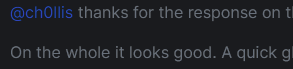
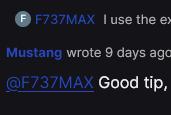
              The dark blue in the usernames (hyperlinks) are slightly hard to read on the dark background.
              03070470-0e1c-48a7-8a9b-e692c8259bb8-image.png

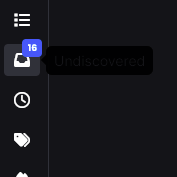
              Some of the text is very difficult to read as on this tooltip flyout:
              ff5a4c0b-e049-4231-bcd2-676f7d2050d6-image.png

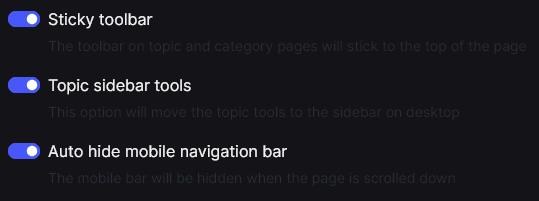
              Profile settings, subtitles to options:
              b5a29b7f-016c-4001-9e48-8dab8b80b634-image.png

              Preview text as I write this post:

              d902e8e8-c66d-4c3a-bbec-06c5da8685f4-image.png

              But on the whole it's a great way to start. I don't know if it's possible to make it a user-selectable theme. I'm just conscious that people that use dark mode in general might not want the forum to auto-switch to this theme (though they can set the preference if comfortable with your dev tools guide above).

              I don't use dark mode for everything all the time. I find it works better in some applications than others.

              1 Reply Last reply
              1
              • ch0llisC
                ch0llisC
                ch0llis
                JF Staff
                wrote on last edited by
                #7

                @Mustang I've made some further changes to the dark mode that should fix most of the issues you've highlighted.

                I will also look into making the dark mode user-selectable, but can't give a date as to when that will be right now.

                M 1 Reply Last reply
                3
                • ch0llisC ch0llis

                  @Mustang I've made some further changes to the dark mode that should fix most of the issues you've highlighted.

                  I will also look into making the dark mode user-selectable, but can't give a date as to when that will be right now.

                  M
                  M
                  Mustang
                  wrote on last edited by
                  #8

                  @ch0llis another big thanks to you. It looks a lot better now with those bits ironed out.

                  I'm grateful for your efforts.

                  1 Reply Last reply
                  0

                  Hello! It looks like you're interested in this conversation, but you don't have an account yet.

                  Getting fed up of having to scroll through the same posts each visit? When you register for an account, you'll always come back to exactly where you were before, and choose to be notified of new replies (either via email, or push notification). You'll also be able to save bookmarks and upvote posts to show your appreciation to other community members.

                  With your input, this post could be even better 💗

                  Register Login
                  Reply
                  • Reply as topic
                  Log in to reply
                  • Oldest to Newest
                  • Newest to Oldest
                  • Most Votes


                  • Login

                  • Don't have an account? Register

                  • Login or register to search.
                  • First post
                    Last post
                  0
                  • Categories
                  • Recent
                  • Tags
                  • Popular