
fs 2024 Vanilla Turbine Failure With No Blacksquare Failure - SOLVED See First Post Edit
-
Ooh, reading that post linked above, are people who are seeing this on SU4 or the SU5 beta? I cannot contribute a data point because I have aircraft and airframe stress damage off by default, but also despite owning the Caravan since day 1 I have been unable to find flying time this week, so I'm waiting until 1.1 drops next week.
-
On the last 4 flights, I had 4 engine failures. On the last 2, the engine stress damage in MSFS2024 (SU4) was turned off. The tablet showed no failure at all. In 2 of the 4 cases, I could restart the engine in flight. All 4 flights were done with the passenger variant.
-
On the last 4 flights, I had 4 engine failures. On the last 2, the engine stress damage in MSFS2024 (SU4) was turned off. The tablet showed no failure at all. In 2 of the 4 cases, I could restart the engine in flight. All 4 flights were done with the passenger variant.
-
Hi. I'm experiencing the same thing. Random MSFS generated engine failures even though engine says 100%. Frustrating, impossible to do a full flight.
-
So, I did a couple of flights today. What I have seen is that if u treat the engine with love, wear and tear of msfs diminishes very slowly. At the same rate of other variables. But if u treat it increasingly worse that starts to increase the rate of descend, to the point it diminishes almost to 0 in a few minutes. However the Caravan tablet seems to work differently and damage is almost none. Probably thats what got us confused.
-
Follow these steps to test please.
Load caravan on the ground cold and dark..
Turn on fs2024 Dev mode, goto Debug/Aircraft/Wear and Tear- Move the wear and tear window to another screen to view..
- Normal startup on caravan, taxi, takeoff, climbout and cruise.
- Note the Turbine engine condition in the fs2024 W&T window decreasing until it gets to zero triggering a catastrophic failure.
Do this test with FS2024 engine and aircraft stress damage off. Is the default fs2024 wear and tear values decreasing?
-
I did try. If u disable aircraft dmg wear and tear numbers dont decrease. If u only disable engine dmg they decrease.
So, with aircraft dmg disabled if u ovestress the engine u see some yellow overstress numbers on the wear and tear. They do make decrease engine health on BS EFB and wear and tear green numbers remain at 100.But if u dont disable aircraft dmg wear and tear decreases and can go very high down. But that is not what the BS EFB computes. So u can destroy the engine in wear and tear but not in the BS EFB.
Pay attention that even if numbers dont decrease if u press toggle once u activate the damage and they decrease.
-
I did try. If u disable aircraft dmg wear and tear numbers dont decrease. If u only disable engine dmg they decrease.
So, with aircraft dmg disabled if u ovestress the engine u see some yellow overstress numbers on the wear and tear. They do make decrease engine health on BS EFB and wear and tear green numbers remain at 100.But if u dont disable aircraft dmg wear and tear decreases and can go very high down. But that is not what the BS EFB computes. So u can destroy the engine in wear and tear but not in the BS EFB.
Pay attention that even if numbers dont decrease if u press toggle once u activate the damage and they decrease.
@pequenyo said in fs 2024 Vanilla Turbine Failure With No Blacksquare Failure:
But if u dont disable aircraft dmg wear and tear decreases and can go very high down. But that is not what the BS EFB computes. So u can destroy the engine in wear and tear but not in the BS EFB.
Can you please give me the most explicit instructions possible to replicate this? Please describe:
- How you loaded the aircraft.
- The state of "Disable Crash Damage"
- The state of "Disable Aircraft Stress Damage"
- The state of "Disable Engine Stress Damage"
- The power setting (torque).
- The ambient air temperature.
- The aircraft altitude.
I know that's a lot, but this is really important to track down. Thank you again for all your help and investigation.
-
@pequenyo said in fs 2024 Vanilla Turbine Failure With No Blacksquare Failure:
But if u dont disable aircraft dmg wear and tear decreases and can go very high down. But that is not what the BS EFB computes. So u can destroy the engine in wear and tear but not in the BS EFB.
Can you please give me the most explicit instructions possible to replicate this? Please describe:
- How you loaded the aircraft.
- The state of "Disable Crash Damage"
- The state of "Disable Aircraft Stress Damage"
- The state of "Disable Engine Stress Damage"
- The power setting (torque).
- The ambient air temperature.
- The aircraft altitude.
I know that's a lot, but this is really important to track down. Thank you again for all your help and investigation.
I mean the only thing that prevents numbers to decrease is aircraft dmg disabled. In this situation what makes BS health to decrease is that u overstress the engine in wear and tear. You will see some yellow overstress numbers.
If aircraft dmg is enabled (not marked in msfs24) wear and tear numbers decrease. They go down pretty slow unless u treat bad the engine. And here the behaviour is different from your EFB. You can punish the engine while your EFB doesnt change or does it much less.
Started cold and dark with none of the disable options activated (so all damages). The difference between asobo and u is that your EFB take only the wear and tear overstress dmg but health can decrease very quick even when no overstress numbers (the yellow ones) are shown. That is the key.
I send some picture with engine conditions. Also weather and altitude (I was flying at 1500 feet)
I reduced health until 7% in wear and tear. From there I am not able to reduce it a a big rate.
With the engine condition of the photo wear and tear health reduced dramatically while your EFB almost didnt move.
Here is the discrepancy with your EFB.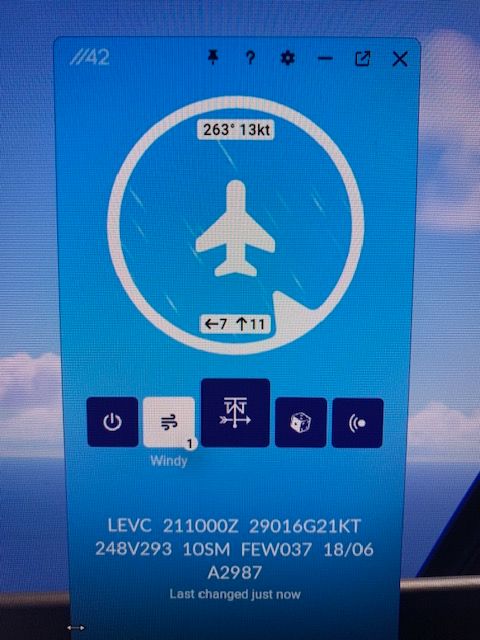
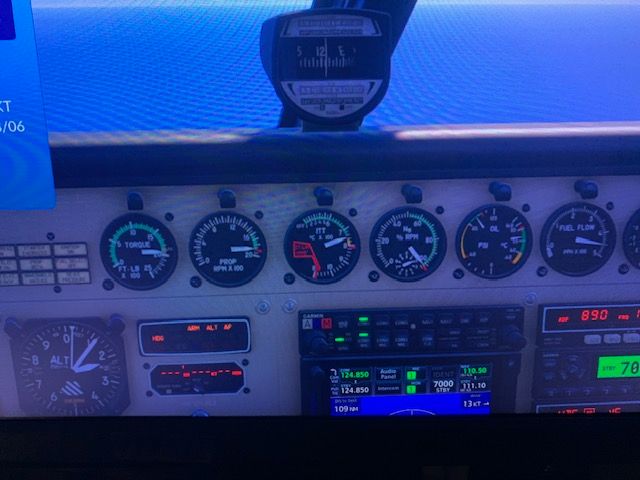
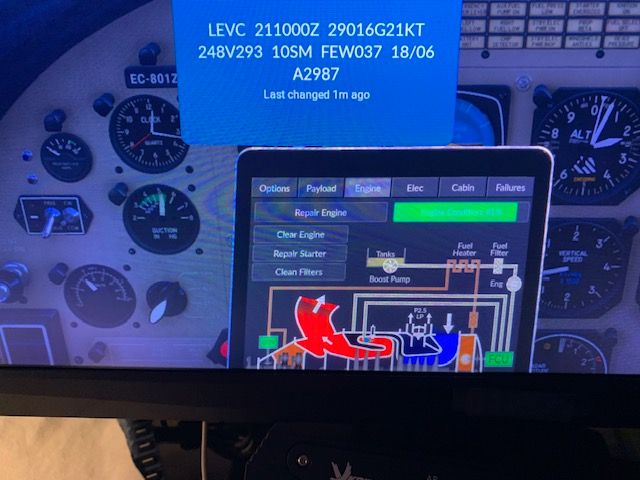
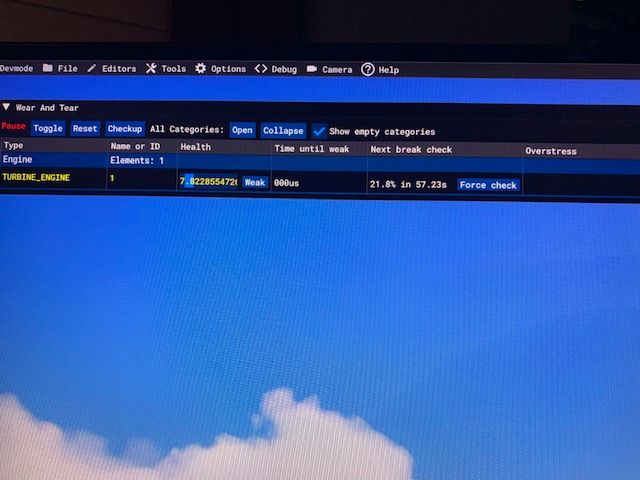
I dont remember what I exactly did yesterday to get the msfs malfunction, but most certainly I treated the engine in a similar way. Yesterday I flew until 6000 feet but dont remember the weather.
-
@Black-Square
I just did a really quick test.You were right. As long as the prop is spinning and FS2024 "Aircraft Stress Damage" is enabled, then FS2024 wear and tear increases. Simply disabling FS2024 "Aircraft Stress Damage" fixes this issue. The other "Stress Damage" toggles make no difference.
I even tested this by using custom winds to spin the prop while the aircraft was cold and dark. As long as the prop spins and "Aircraft Stress Damage" is enabled, the Caravan will destroy itself over time.
-
@Black-Square
I just did a really quick test.You were right. As long as the prop is spinning and FS2024 "Aircraft Stress Damage" is enabled, then FS2024 wear and tear increases. Simply disabling FS2024 "Aircraft Stress Damage" fixes this issue. The other "Stress Damage" toggles make no difference.
I even tested this by using custom winds to spin the prop while the aircraft was cold and dark. As long as the prop spins and "Aircraft Stress Damage" is enabled, the Caravan will destroy itself over time.
@Buzz Thanks for confirming that. Since I saw this in all the default aircraft, I'm not too worried about it, especially since I recommend airframe stress damage be disabled for complex aircraft anyway; however the rapid degradation that @pequenyo was demonstrating is what we must diagnose. Clearly, there is some undocumented configuration number that Asobo is using to determine when the engine is becoming "damaged", and we must figure out what that is so they can either be asked to change it (as they are being asked to do with airspeed limitations) or I can create a solution.
For now, if anyone else wants to confirm that this problem is eliminated by disabling "Aircraft Stress Damage" alone, that would be greatly appreciated.

