
Holding entries
-
Hi again,
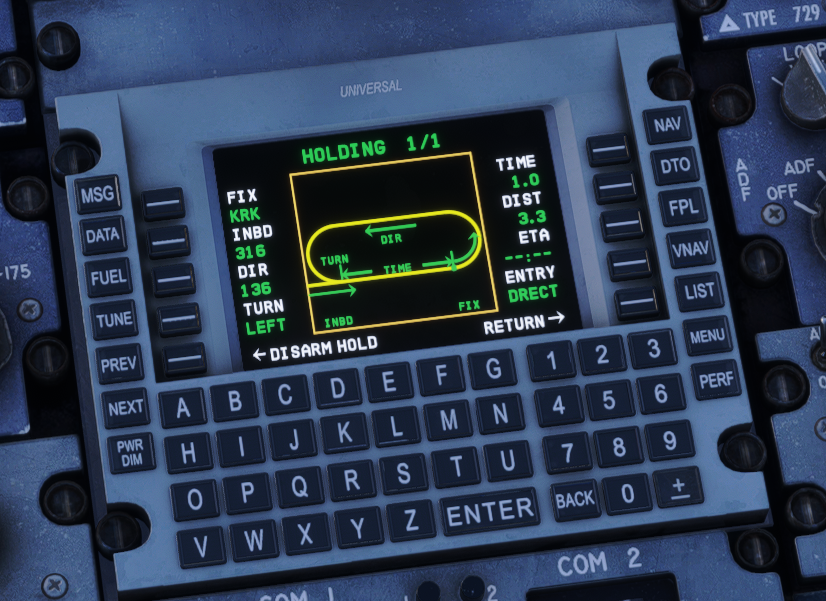
I couldnt find any information regarding this in the manual so ill ask it here. Is it true that you can only fly direct entries using the UNS-1 FMS? There isnt much regarding this page in the manual anyway but i assume:
INBD = is the inbound course,
DIR = im not sure, but probably the outbound course
ENTRY = cannot be changedShouldnt i be able to change the type of hold entry? I cant imagine you can only do direct entries... Unless this feature isnt implemented in the FMS.
Kind regards, Leon -
Ok so after some research, i found out that 1. This FMS is made by WT and is a default item from MSFS2024 which is used by many other aircraft when i initially thought that it was custom made by JF. 2. There is a page which allows you to change the entry for the hold when you press on the Entry button. 3. Since this is made by WT im not sure mentioning it here in the forum will gain much attention and get any fix anyway. So ill go bother WT about this lol.
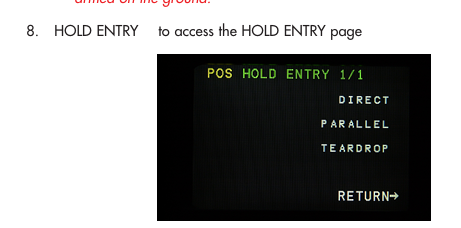
This is how it look irl.
Regards, Leon
-
The UNS-1 FMS included in our 146 Professional and F28 Professional is a fully custom-coded, in-house product.
The manual can be found here: https://downloads.justflight.com/products/JF_UNS1_FMC/MSFS_UNS-1_FMS_Manual_v5.pdf
Mark - Just Flight
