
EFB CG% issue
-
Hi all,
I was wondering if anyone was able to assist with this problem.
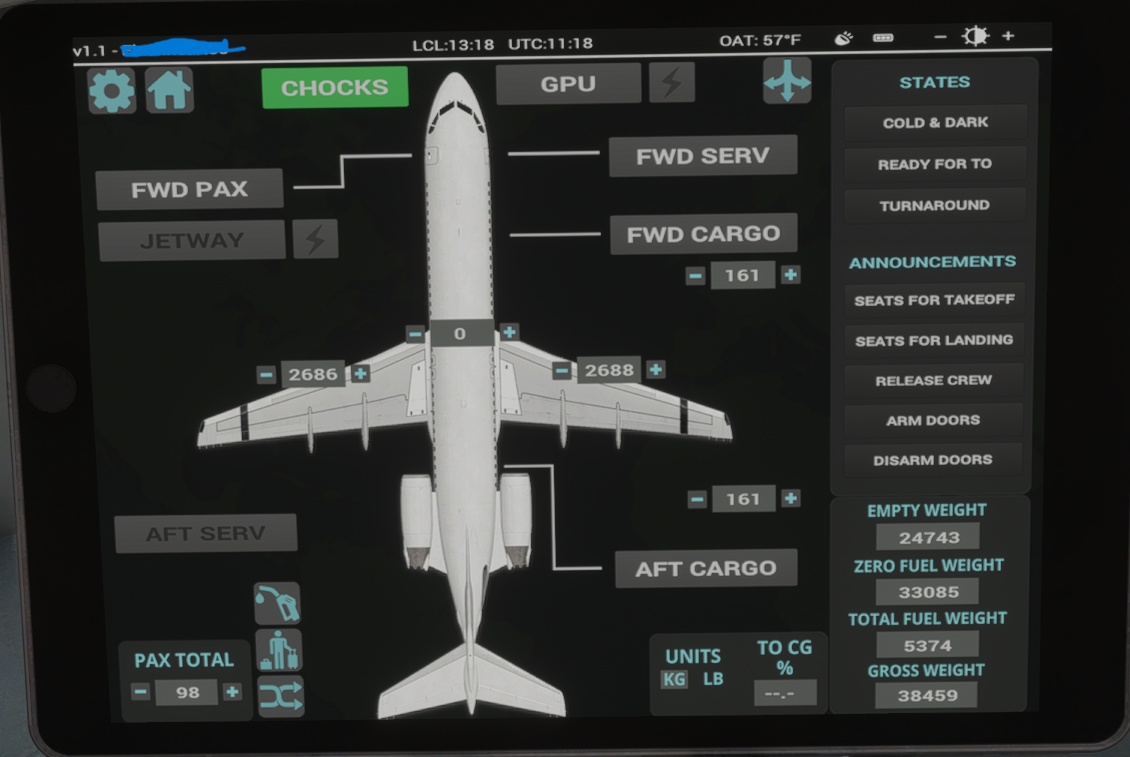
Once I upload the simbrief plan onto the aircraft screen the cg% isn't showing. I've tried everything to my primitive knowledge on this. C&D, Turnaround and takeoff mode. Filled out the entire FMS too but nothing

Screenshot added for reference.
Thanks
-
Dashed lines on the TO CG % field indicate that the centre of gravity is not stable. For example, after an instant boarding/refuelling, there will be a sudden shift in TO CG %, so dashed lines will be displayed for a few seconds whilst it stabilises.
Do you perhaps have any mods installed that could be affecting the aircraft's weight & balance, or other flight model parameters?
Mark - Just Flight
-
Hi Mark,
Thank you for the suggestion.
To my knowledge I've nothing that could be a causing any conflict. The standard stuff such as GSX, Simbrief, navigraph etc.
Would it be worth doing a re-installation or do a community folder emptying trial and error test?
Thanks
-
Yes, it'd be worth a try. If it still persists after a reinstall, it may be worth trying it again with only the F70 and/or F100 in your Community folder just to rule out any other conflicts.
The easiest way to do that will be to rename your Community folder to something like "Community.old", then create a new Community folder named "Community" and reinstall the F70 and/or F100 into that new folder. Then, once you've tried it in the sim, you can delete the new "Community" folder and rename the "Community.old" folder back to "Community" to restore your previous install.
Mark - Just Flight
-
Ah, yes, that could be the cause if it's trying to change the aircraft's fuel and payload.
I know the default MSFS Weight and Balance controls can cause issues when using our custom fuel and payload manager in the EFB, so if the SimBrief app is importing fuel and weights, that could also cause similar issues.
We'll make a note to see if we can support the SimBrief EFB app's imports, but for now, we'd recommend only using the SimBrief import functionality built into our EFB/tablet.
Mark - Just Flight

