Skip to content
  • Categories
  • Recent
  • Tags
  • Popular
  • Users
Collapse
Just Flight Community Forum
  1. Home
  2. Just Flight
  3. MSFS Products
  4. RJ Professional
  5. Duplicated checklists? Is it me or is this a bug?

Duplicated checklists? Is it me or is this a bug?

Scheduled Pinned Locked Moved RJ Professional
3 Posts 2 Posters 48 Views 1 Watching
  • Oldest to Newest
  • Newest to Oldest
  • Most Votes
Reply
  • Reply as topic
Log in to reply
This topic has been deleted. Only users with topic management privileges can see it.
  • toby23T Offline
    toby23T Offline
    toby23
    wrote last edited by
    #1

    I've just got into the RJ 100 passenger variant after exploring the Cargo variant (and falling in love).
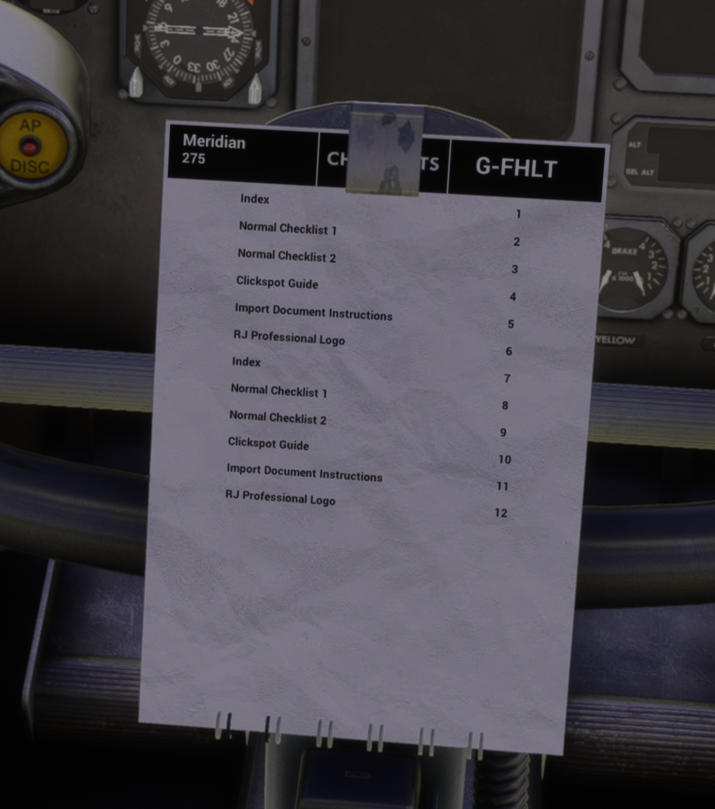
    On the control column in the passenger variant, I see duplicated checklists.
    Is that because I didn't restart the sim or because there's a bug in the checklist file?

    Thank you,
    Toby

    4ca0cf1f-26c5-4740-8907-bf7a38b308d0.png

    Ryzen 5800X3D, 64GB RAM, RTX 4090, Windows 11

    1 Reply Last reply
    0
    • MarkM Online
      MarkM Online
      Mark
      JF Staff
      wrote last edited by
      #2

      The checklists that are displayed on the contents page are based on the pages listed in the 'RJ_checklist_list.ini' file located at the following file directory:

      ...\Community\justflight-aircraft-rj\Data\Images\Checklist

      The duplicates can either be removed from that .ini manually, or reinstalling the product will also revert them to their default state.

      Hope that helps.

      Mark - Just Flight

      Just Flight Development Assistant

      toby23T 1 Reply Last reply
      1
      • MarkM Mark

        The checklists that are displayed on the contents page are based on the pages listed in the 'RJ_checklist_list.ini' file located at the following file directory:

        ...\Community\justflight-aircraft-rj\Data\Images\Checklist

        The duplicates can either be removed from that .ini manually, or reinstalling the product will also revert them to their default state.

        Hope that helps.

        Mark - Just Flight

        toby23T Offline
        toby23T Offline
        toby23
        wrote last edited by
        #3

        @Mark Thank you Mark.

        Ryzen 5800X3D, 64GB RAM, RTX 4090, Windows 11

        1 Reply Last reply
        0
        Reply
        • Reply as topic
        Log in to reply
        • Oldest to Newest
        • Newest to Oldest
        • Most Votes


        • Login

        • Don't have an account? Register

        • Login or register to search.
        • First post
          Last post
        0
        • Categories
        • Recent
        • Tags
        • Popular
        • Users