Skip to content
  • Categories
  • Recent
  • Tags
  • Popular
  • Users
Collapse
Just Flight Community Forum
  1. Home
  2. Just Flight
  3. MSFS Products
  4. RJ Professional
  5. Honeycomb Bravo and increment/decrement knob

Honeycomb Bravo and increment/decrement knob

Scheduled Pinned Locked Moved RJ Professional
12 Posts 4 Posters 263 Views 1 Watching
  • Oldest to Newest
  • Newest to Oldest
  • Most Votes
Reply
  • Reply as topic
Log in to reply
This topic has been deleted. Only users with topic management privileges can see it.
  • T Offline
    T Offline
    Trening
    wrote last edited by
    #3

    Where did you download this from ?

    R 1 Reply Last reply
    0
    • T Trening

      Where did you download this from ?

      R Offline
      R Offline
      RPGamerous
      wrote last edited by RPGamerous
      #4

      @Trening You can get it at flightsim.to and maybe simmarket as well. Around USD 20 if I remember right. I use it for everything after the sim losing all my controller profiles twice. There's a learning curve but once you understand it, it's pretty easy to just do the simple bindings. If you get deeper into it, it gets more complicated and time consuming looking for simvars and events to bind your hardware to. There are some profiles people have posted for various aircraft; I seem intent on doing everything the hard way lol

      You can also try doing it with MobiFlight, which is free. I don't love the interface, but it works -- I use it quite a bit for my WinCtrl 737 panels. You can check it out at Mobiflight.com

      toby23T 1 Reply Last reply
      0
      • T Offline
        T Offline
        Trening
        wrote last edited by
        #5

        Thanks for the feedback, but it's too complicated for me.

        1 Reply Last reply
        0
        • R RPGamerous

          @Trening You can get it at flightsim.to and maybe simmarket as well. Around USD 20 if I remember right. I use it for everything after the sim losing all my controller profiles twice. There's a learning curve but once you understand it, it's pretty easy to just do the simple bindings. If you get deeper into it, it gets more complicated and time consuming looking for simvars and events to bind your hardware to. There are some profiles people have posted for various aircraft; I seem intent on doing everything the hard way lol

          You can also try doing it with MobiFlight, which is free. I don't love the interface, but it works -- I use it quite a bit for my WinCtrl 737 panels. You can check it out at Mobiflight.com

          toby23T Offline
          toby23T Offline
          toby23
          wrote last edited by
          #6

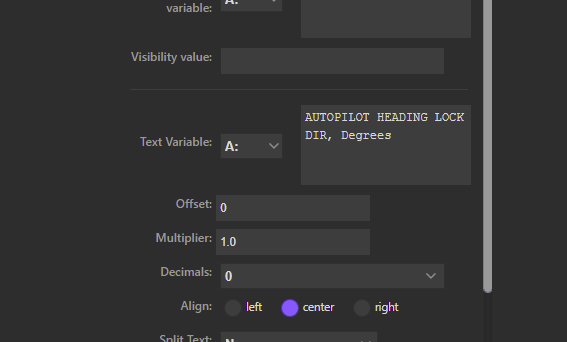
          @RPGamerous Which variable are using to read the Heading? I can adjust it with HEADING_BUG_DEC but I cannot read the value with AUTOPILOT HEADING LOCK DIR, Degrees, to display it on my Stream Deck. This value works in 99% of the aircraft I own. Thanks

          Ryzen 5800X3D, 64GB RAM, RTX 4090, Windows 11

          R 1 Reply Last reply
          0
          • toby23T toby23

            @RPGamerous Which variable are using to read the Heading? I can adjust it with HEADING_BUG_DEC but I cannot read the value with AUTOPILOT HEADING LOCK DIR, Degrees, to display it on my Stream Deck. This value works in 99% of the aircraft I own. Thanks

            R Offline
            R Offline
            RPGamerous
            wrote last edited by RPGamerous
            #7

            @toby23 I'll check after I finish this 146 flight in a couple hours

            Edit: I realized I could check while I'm still flying. Unfortunately, it turns out my Stream Deck profile for the RJ doesn't include a heading display. But I'll try to suss it out after my flight.

            1 Reply Last reply
            1
            • R Offline
              R Offline
              RPGamerous
              wrote last edited by
              #8

              @toby23 I wasn't able to find anything specific to the RJ, so I tried AUTOPILOT HEADING LOCK DIR, Degrees and it works for me!

              toby23T 1 Reply Last reply
              0
              • R RPGamerous

                @toby23 I wasn't able to find anything specific to the RJ, so I tried AUTOPILOT HEADING LOCK DIR, Degrees and it works for me!

                toby23T Offline
                toby23T Offline
                toby23
                wrote last edited by toby23
                #9

                @RPGamerous That's what I use all the time too but on the RJ100 it doesn't display the actual heading, trying to solve this. Thanks for checking. Are you displaying this as an A: Variable on the Stream Deck?
                c8e38e0a-24c1-44d2-bc9c-d4a0a5eb83e7-image.png

                Ryzen 5800X3D, 64GB RAM, RTX 4090, Windows 11

                1 Reply Last reply
                0
                • R Offline
                  R Offline
                  RPGamerous
                  wrote last edited by
                  #10

                  Yes, exactly.

                  1 Reply Last reply
                  0
                  • toby23T Offline
                    toby23T Offline
                    toby23
                    wrote last edited by
                    #11

                    Thanks for your help, I don't know why it's not displaying on my setup but I'm having a great time learning to fly the RJ.

                    Ryzen 5800X3D, 64GB RAM, RTX 4090, Windows 11

                    R 1 Reply Last reply
                    0
                    • toby23T toby23

                      Thanks for your help, I don't know why it's not displaying on my setup but I'm having a great time learning to fly the RJ.

                      R Offline
                      R Offline
                      RPGamerous
                      wrote last edited by
                      #12

                      @toby23 It's a great plane! I don't fly it enough because I have a slight preference for the more manual 146.

                      1 Reply Last reply
                      0
                      Reply
                      • Reply as topic
                      Log in to reply
                      • Oldest to Newest
                      • Newest to Oldest
                      • Most Votes


                      • Login

                      • Don't have an account? Register

                      • Login or register to search.
                      • First post
                        Last post
                      0
                      • Categories
                      • Recent
                      • Tags
                      • Popular
                      • Users